
Account Contatti
Il tuo carrello
Spedizione DPD & FedEx
Serve aiuto? Chiedi all'AI

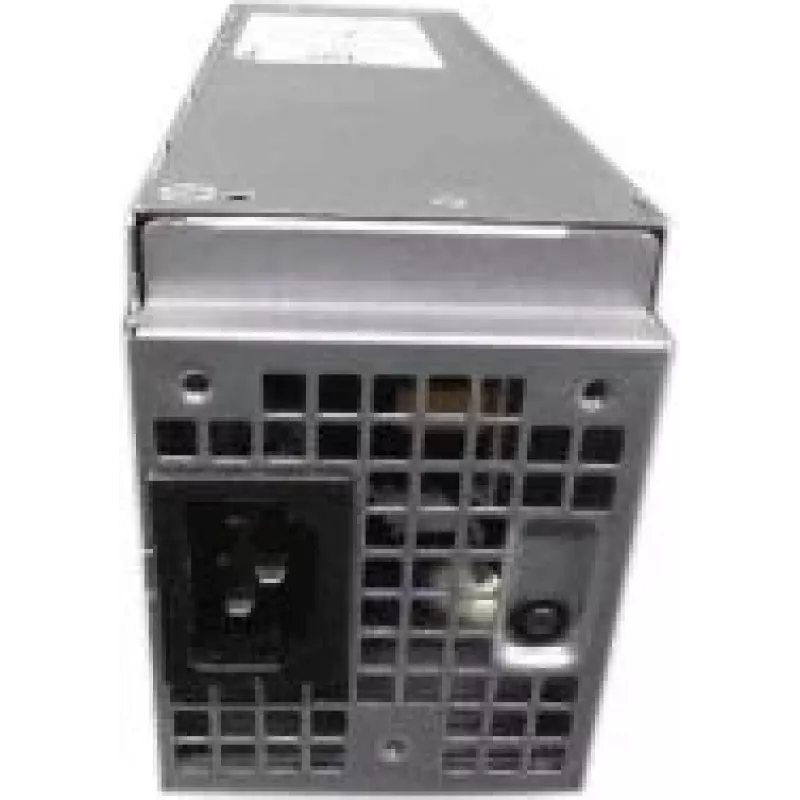
Alimentatore Dell 200W conforme EPA 4FHYW per sistemi Dell compatibili

Alimentatore Dell 200W conforme EPA 4FHYW per sistemi Dell compatibili
106,94 €
The Dell 200W EPA compliant power supply provides reliable 200-watt DC output for compatible Dell systems. Designed as a replacement or spare unit for servers and workstations that require a 200W supply, this PSU features an EPA-compliant design to meet energy efficiency regulations and reduce stand... Leggi di più
Stock EsauritoNon disponibile Codice 1507670 Marca DELL Modello 4FHYW Garanzia 2 anni

Spedizioni e resi

The Dell 200W EPA compliant power supply provides reliable 200-watt DC output for compatible Dell systems. Designed as a replacement or spare unit for servers and workstations that require a 200W supply, this PSU features an EPA-compliant design to meet energy efficiency regulations and reduce standby power consumption. The compact form factor and standard electrical interfaces allow straightforward installation in systems built to accept this type of power module.

Advantages

This power supply restores system power capacity to rated levels while maintaining compliance with current energy efficiency standards. It delivers stable DC output under typical server and workstation loads and helps reduce overall system power draw through an EPA-compliant design. The unit’s form factor and connector compatibility simplify swap-in replacement, cutting repair time and minimizing downtime for critical systems.

Suitable for

  • Replacement of a failed or aging 200W power supply in compatible Dell servers and workstations
  • Maintaining spare parts inventory for IT departments and service providers
  • Restoring systems to manufacturer-specified power and energy compliance

Key specifications

  • Output power: 200 W DC
  • Compliance: EPA energy-efficiency compliant
  • Form factor: compact server/workstation power module
  • Typical applications: rack or tower servers, workstations that accept 200W PSUs
  • Connectors: standard internal power connectors for compatible systems

How to use

Power down the host system and disconnect external power before replacing the unit. Remove the existing power supply following the system manufacturer’s service instructions and anti-static precautions. Align the replacement power supply with the chassis guides, connect the internal power and any auxiliary connectors securely, then fasten according to the system’s installation procedure. Reconnect external power and perform a power-on test to verify that the system recognizes the new supply and operates within expected parameters.

Recommendations

Use only in systems specified by the equipment manufacturer for 200W power modules. Store spare units in a dry, dust-free environment and avoid exposure to extreme temperatures or moisture. If the system indicates power or compatibility errors after installation, consult the system service manual or contact qualified technical support for diagnostics.

Punti salienti
  • Replacement of a failed or aging 200W power supply in compatible Dell servers and workstations
  • Maintaining spare parts inventory for IT departments and service providers
  • Restoring systems to manufacturer-specified power and energy compliance
  • Output power: 200 W DC
  • Compliance: EPA energy-efficiency compliant
  • Form factor: compact server/workstation power module
  • Typical applications: rack or tower servers, workstations that accept 200W PSUs
  • Connectors: standard internal power connectors for compatible systems
Storico prezzi degli ultimi 6 mesi
Alimentatore Dell 200W conforme EPA 4FHYW per sistemi Dell compatibili
Attuale
106,94 €
Minimo
106,01 €
Massimo
110,84 €
Variazione 24 h
+0,53 €   +0%
Settimana
+0,72 €   +1%
Mese
—   

Prodotti più popolari in questa categoria

Ciao, sono l'assistente AI di DistriNode. Posso aiutarti a trovare prodotti, confrontare le opzioni, creare preventivi in PDF o aprire richieste di assistenza.