
Account Contatti
Il tuo carrello
Spedizione DPD & FedEx
Serve aiuto? Chiedi all'AI

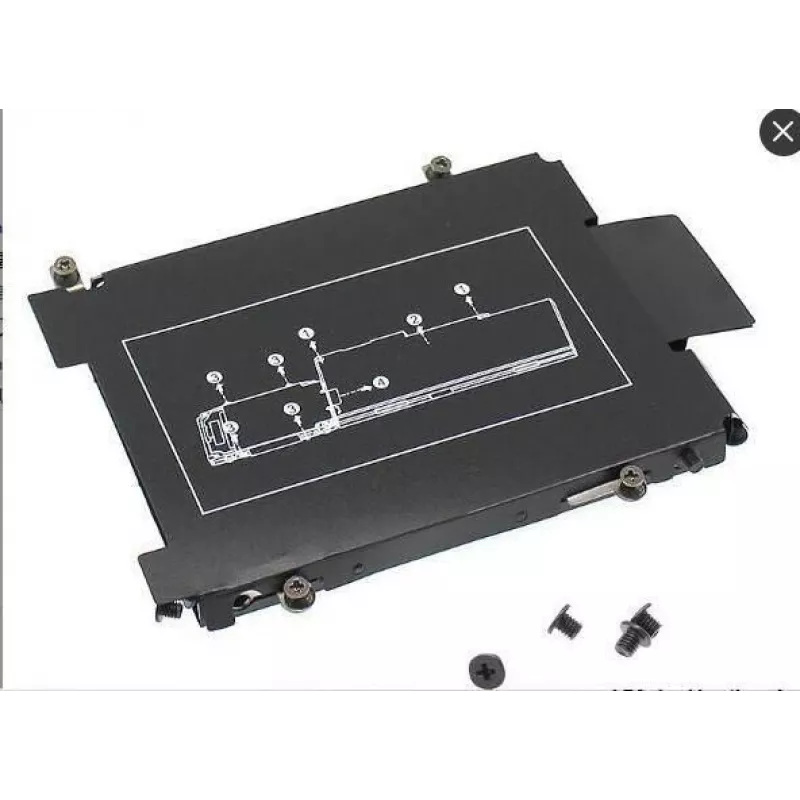
CoreParts KIT383 accessorio per laptop telaio di montaggio per disco fisso/SSD

CoreParts KIT383 accessorio per laptop telaio di montaggio per disco fisso/SSD
26,36 €
The CoreParts Laptop HDD/SSD caddy HP KIT383 by MicroStorage is a black 2nd drive adapter designed to fit HP laptops. With external dimensions of 113 mm (W) x 81 mm (D) x 16 mm (H), this caddy enables installation of an additional HDD or SSD to expand laptop storage capacity and improve data flexibi... Leggi di più
Stock EsauritoNon disponibile Codice 2406373 Marca COREPARTS Modello KIT383 Garanzia 2 anni

Spedizioni e resi

The CoreParts Laptop HDD/SSD caddy HP KIT383 by MicroStorage is a black 2nd drive adapter designed to fit HP laptops. With external dimensions of 113 mm (W) x 81 mm (D) x 16 mm (H), this caddy enables installation of an additional HDD or SSD to expand laptop storage capacity and improve data flexibility. Supplied as a single unit, it is compatible with consumer and business use where a replacement optical drive or spare bay is available.

Advantages

The KIT383 provides a straightforward way to add a second internal storage device without modifying the motherboard or chassis. Its compact form factor matches typical laptop drive bays and supports both HDD and SSD media, offering a practical, low-cost upgrade path. The unit is manufactured for easy installation and is supplied by MicroStorage under the CoreParts range.

Suitable for

  • HP laptops with a removable optical drive or spare 9.5–12.7 mm bay
  • Users who need extra storage for files, backups or applications
  • Upgrading from HDD to SSD while retaining original drive

Key specifications

  • Model: KIT383
  • Brand: MicroStorage / CoreParts range
  • Color: Black
  • Dimensions: 113 mm (W) x 81 mm (D) x 16 mm (H)
  • Compatible media: 2.5" HDD or SSD
  • Quantity: 1 piece
  • MPN: KIT383
  • EAN: 5711783900627

How to use

Power down the laptop and remove the battery (if removable). Remove the optical drive or access cover according to the laptop manufacturer instructions. Slide the 2.5" HDD or SSD into the caddy until it connects securely to the SATA connector, then fasten it with the provided screws if applicable. Insert the caddy into the laptop bay and secure the bay or optical drive screw. Reinstall the battery, power on the laptop and verify the new drive is detected in the BIOS/operating system.

Recommendations

Ensure the caddy thickness matches your laptop bay (16 mm) and verify HP model compatibility before purchase. Back up important data prior to installation and handle the drive on an anti-static surface.
Punti salienti
  • HP laptops with a removable optical drive or spare 9.5–12.7 mm bay
  • Users who need extra storage for files, backups or applications
  • Upgrading from HDD to SSD while retaining original drive
  • Model: KIT383
  • Brand: MicroStorage / CoreParts range
  • Color: Black
  • Dimensions: 113 mm (W) x 81 mm (D) x 16 mm (H)
  • Compatible media: 2.5" HDD or SSD
  • Quantity: 1 piece
  • MPN: KIT383
  • EAN: 5711783900627
Specifiche
Altezza
16 mm
Altezza confezione
16 mm
Codice Sistema Armonizzato (HS)
84733080
Colore del prodotto
Black
Compatibilità
Elitebook 725 G3, 745 G3, 820 G3, 840 G3, 850 G3
Larghezza
113 mm
Larghezza confezione
113 mm
Marche compatibili
HP
Peso
10 g
Peso confezione
12 g
Profondità
81 mm
Profondità confezione
81 mm
Quantità per confezione
1 pc(s)
Tipo di prodotto
Laptop HDD/SSD caddy

Brochure

Apri documento
Lo storico prezzi non è ancora disponibile
Stiamo ancora raccogliendo dati giornalieri sufficienti sui prezzi per questo prodotto.

Prodotti più popolari in questa categoria

Venditore: UAB KUR LT · Laisvės pr. 125A, LT-06118 Vilnius, Lituania · Codice società 303192950 · Partita IVA UE LT100008198612 · Spedizione dall'UE (Lituania)
Ciao, sono l'assistente AI di DistriNode. Posso aiutarti a trovare prodotti, confrontare le opzioni, creare preventivi in PDF o aprire richieste di assistenza.