
Account Contatti
Il tuo carrello
Spedizione DPD & FedEx
Serve aiuto? Chiedi all'AI

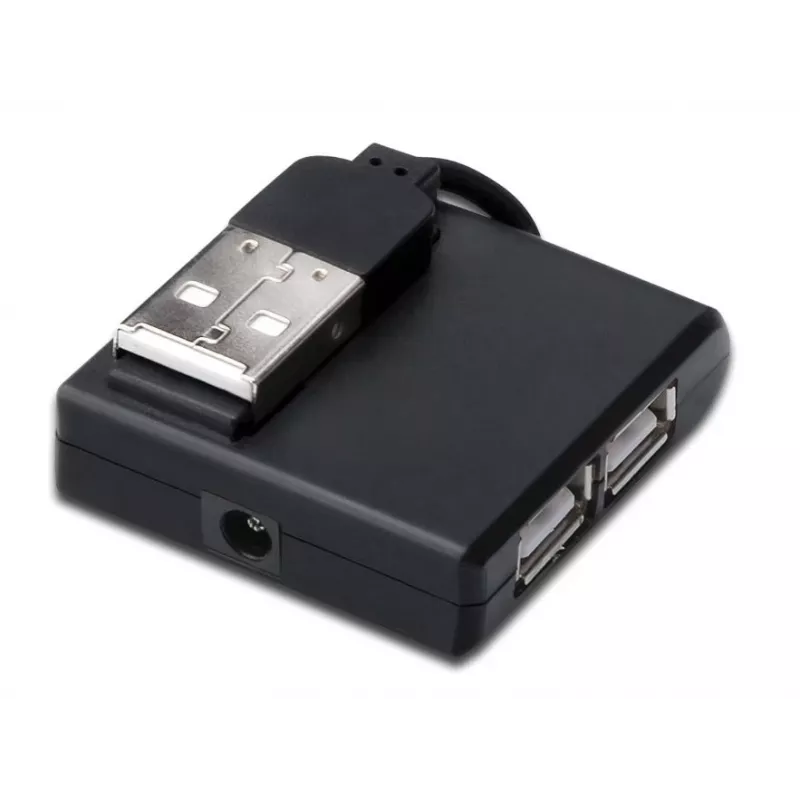
Microconnect MC-USB2.0HUB4P hub di interfaccia USB 2.0 400 Mbit/s nero

Microconnect MC-USB2.0HUB4P hub di interfaccia USB 2.0 400 Mbit/s nero
33,89 €
The MicroConnect MC-USB2.0HUB4P is a compact USB 2.0 hub that adds four USB 2.0 ports to a computer or laptop. It supports data transfer rates up to 400 Mbit/s and comes in a slim black housing that is lightweight and portable, making it suitable for use at home, in the office, or on the go.Advantag... Leggi di più
Stock EsauritoNon disponibile Codice 1183255 Marca MICROCONNECT Modello MC-USB2.0HUB4P Garanzia 2 anni
CategoriaHub USB

Spedizioni e resi

The MicroConnect MC-USB2.0HUB4P is a compact USB 2.0 hub that adds four USB 2.0 ports to a computer or laptop. It supports data transfer rates up to 400 Mbit/s and comes in a slim black housing that is lightweight and portable, making it suitable for use at home, in the office, or on the go.

Advantages

The hub provides four additional USB 2.0 interfaces in a single compact unit, enabling connection of multiple peripherals at once. With a low weight of 20 g and small package dimensions, it is easy to carry and store. The black design fits most workspaces and devices, and the USB 2.0 host and hub interfaces ensure broad compatibility with a wide range of USB devices.

Suitable for

  • Connecting mice, keyboards and printers
  • Attaching external storage devices and flash drives
  • Charging small USB devices (via USB 2.0 ports)
  • Expanding USB connectivity for laptops and desktops with limited ports

Key specifications

  • Brand: MicroConnect
  • Model: MC-USB2.0HUB4P
  • Ports quantity: 4
  • Host interface: USB 2.0
  • Hub interfaces: USB 2.0
  • Data transfer rate: up to 400 Mbit/s
  • Product colour: Black
  • Weight: 0.02 kg

How to use

Connect the MicroConnect MC-USB2.0HUB4P to an available USB 2.0 port on your computer or laptop. Once connected, plug your USB devices into the hub’s four ports. The hub is plug-and-play with most operating systems and typically requires no additional drivers. For devices that require more power than USB 2.0 can provide, consider connecting externally powered peripherals or using a powered hub.

Recommendations

Use the hub for data transfer and connecting low-power peripherals. Avoid relying on this passive USB 2.0 hub for charging high-current devices; for such needs, choose a powered hub or connect directly to a powered USB port.
Punti salienti
  • Connecting mice, keyboards and printers
  • Attaching external storage devices and flash drives
  • Charging small USB devices (via USB 2.0 ports)
  • Expanding USB connectivity for laptops and desktops with limited ports
  • Brand: MicroConnect
  • Model: MC-USB2.0HUB4P
  • Ports quantity: 4
  • Host interface: USB 2.0
  • Hub interfaces: USB 2.0
  • Data transfer rate: up to 400 Mbit/s
  • Product colour: Black
  • Weight: 0.02 kg
Specifiche
Altezza confezione
19 mm
Codice Sistema Armonizzato (HS)
84719000
Colore del prodotto
Black
Interfacce hub
USB 2.0
Interfaccia host
USB 2.0
Jack DC-in
Yes
Larghezza confezione
157 mm
Numero di porte
4
Peso
20 g
Peso confezione
24 g
Profondità confezione
120 mm
Velocità di trasferimento dati
400 Mbit/s

Brochure

Apri documento
Lo storico prezzi non è ancora disponibile
Stiamo ancora raccogliendo dati giornalieri sufficienti sui prezzi per questo prodotto.

Scrivi una recensione

Valutazione *
Il tuo nome sarà mostrato pubblicamente – puoi usare un nickname. Invitiamo gli acquirenti a scrivere recensioni; le controlliamo prima della pubblicazione e pubblichiamo anche quelle critiche.

Altri prodotti MICROCONNECT in questa categoria

Prodotti più popolari in questa categoria

Venditore: UAB KUR LT · Laisvės pr. 125A, LT-06118 Vilnius, Lituania · Codice società 303192950 · Partita IVA UE LT100008198612 · Spedizione dall'UE (Lituania)
Ciao, sono l'assistente AI di DistriNode. Posso aiutarti a trovare prodotti, confrontare le opzioni, creare preventivi in PDF o aprire richieste di assistenza.
Tutte le categorie