
Account Contatti
Il tuo carrello
Spedizione DPD & FedEx
Serve aiuto? Chiedi all'AI

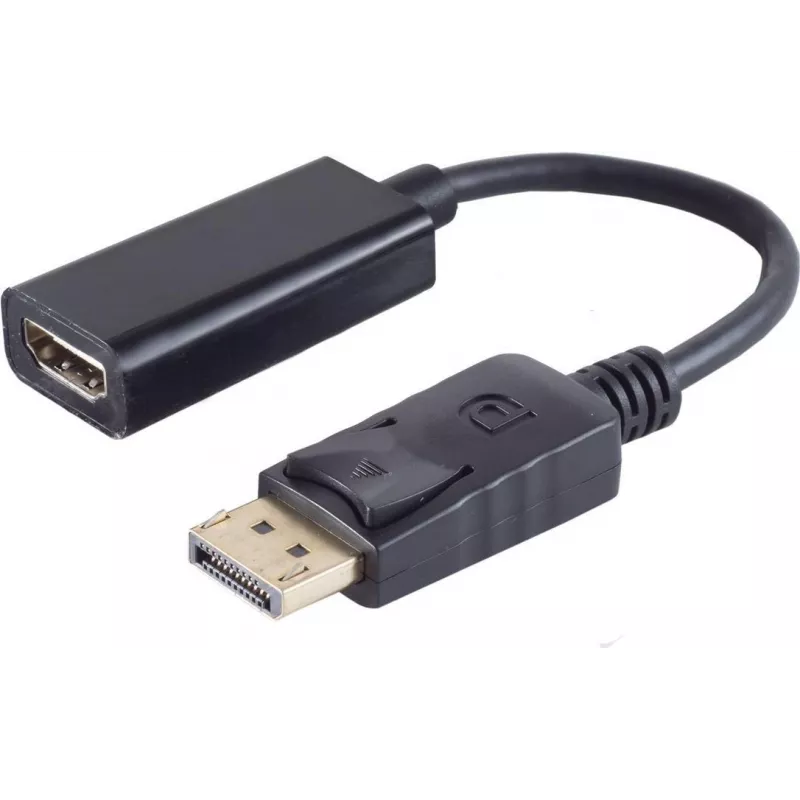
Adattatore DisplayPort-HDMI ShiverPeaks 14-05011 — convertitore DisplayPort 1.2 a HDMI

Adattatore DisplayPort-HDMI ShiverPeaks 14-05011 — convertitore DisplayPort 1.2 a HDMI
18,95 €
The ShiverPeaks DisplayPort to HDMI adapter 14-05011 converts a DisplayPort 1.2 signal to an HDMI output, allowing a computer or laptop with DisplayPort to connect to HDMI monitors, TVs or projectors. The adapter is designed for plug-and-play operation and supports video transmission and audio pass-... Leggi di più
Stock 258 Codice 2351922 Marca SHIVERPEAKS Modello 14-05011 Garanzia 2 anni

Spedizioni e resi

Consegna stimata Mercoledì, Ottobre 28
Ti terremo aggiornato tramite il nostro sistema di tracciamento dettagliato
Opzioni di pagamento
Carta di credito/debitoVisaMastercardPayPalApple PayGoogle PayBonifico bancario

The ShiverPeaks DisplayPort to HDMI adapter 14-05011 converts a DisplayPort 1.2 signal to an HDMI output, allowing a computer or laptop with DisplayPort to connect to HDMI monitors, TVs or projectors. The adapter is designed for plug-and-play operation and supports video transmission and audio pass-through when the source device provides audio over DisplayPort. It is suitable for presentations, home media playback and extending single-display workstations to HDMI-equipped screens.

Advantages

This adapter offers a compact and passive conversion from DisplayPort 1.2 to HDMI without the need for external power or drivers. It preserves digital video quality and, where supported by the source, carries stereo audio to HDMI displays. The small form factor and standard connector interfaces make it easy to carry and install in a range of environments, from meeting rooms to home entertainment setups.

Key specifications

  • Input: DisplayPort 1.2 (male)
  • Output: HDMI (female)
  • Video compatibility: up to DisplayPort 1.2 feature set (digital video conversion)
  • Audio: supports audio pass-through if source provides audio over DisplayPort
  • Power: passive, no external power required
  • Form factor: compact inline adapter for direct connection

How to use

Insert the DisplayPort end of the adapter into the DisplayPort output on the computer or laptop until it seats securely. Connect an HDMI cable from the adapter’s HDMI female port to the HDMI input on the target display, TV or projector. Select the appropriate HDMI input on the display and set the computer’s display settings to extend or mirror the screen as required. If audio is expected, verify in the operating system’s sound settings that the HDMI output is selected as the playback device.

Recommendations

For stable operation, use a high-quality HDMI cable and ensure the source device supports audio over DisplayPort if audio output is needed. When using high resolutions or refresh rates, verify that both the source and the display support the desired settings and adjust the graphics output accordingly. Avoid excessive bending of connectors and keep the adapter free from mechanical strain.

Punti salienti
  • Показа презентаций с ноутбука на HDMI-проектор или экран
  • Подключения ПК с DisplayPort к телевизору или монитору HDMI для воспроизведения видео
  • Расширения рабочего стола на дополнительный экран с HDMI-входом
  • Input: DisplayPort 1.2 (male)
  • Output: HDMI (female)
  • Video compatibility: up to DisplayPort 1.2 feature set (digital video conversion)
  • Audio: supports audio pass-through if source provides audio over DisplayPort
  • Power: passive, no external power required
  • Form factor: compact inline adapter for direct connection
Storico prezzi degli ultimi 6 mesi
Adattatore DisplayPort-HDMI ShiverPeaks 14-05011 — convertitore DisplayPort 1.2 a HDMI
Attuale
18,95 €
Minimo
18,40 €
Massimo
18,95 €
Variazione 24 h
+0,55 €   +3%
Settimana
+0,29 €   +2%
Mese
+0,34 €   +2%

Prodotti più popolari in questa categoria

Ciao, sono l'assistente AI di DistriNode. Posso aiutarti a trovare prodotti, confrontare le opzioni, creare preventivi in PDF o aprire richieste di assistenza.