
Account Contatti
Il tuo carrello
Spedizione DPD & FedEx
Serve aiuto? Chiedi all'AI

Adattatore per cavo video Lanberg AD-UC-DP-01

Adattatore per cavo video Lanberg AD-UC-DP-01
9,96 €
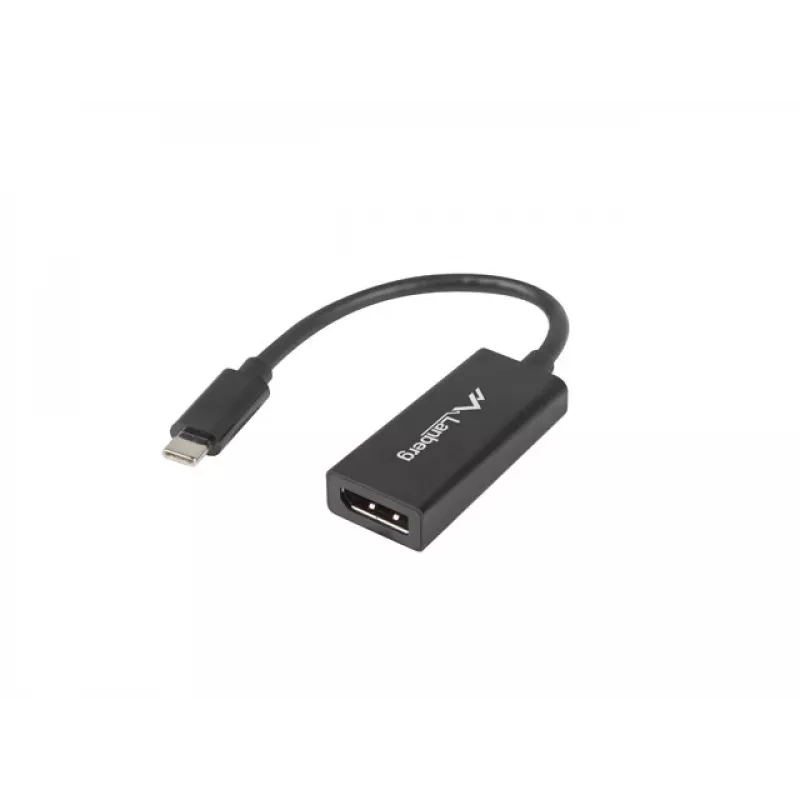
The Lanberg AD-UC-DP-01 is a compact 0.15 m USB-C to DisplayPort video cable adapter that connects USB Type-C devices to DisplayPort monitors and displays. Designed for reliable transmission of video signals, it is suitable for connecting laptops, compatible smartphones or other devices with a USB T... Leggi di più
Stock 17 Codice 1271318 Marca LANBERG Modello AD-UC-DP-01 Garanzia 2 anni

Spedizioni e resi

Consegna stimata Venerdì, Ottobre 9
Ti terremo aggiornato tramite il nostro sistema di tracciamento dettagliato
Opzioni di pagamento
Carta di credito/debitoVisaMastercardPayPalApple PayGoogle PayBonifico bancario

The Lanberg AD-UC-DP-01 is a compact 0.15 m USB-C to DisplayPort video cable adapter that connects USB Type-C devices to DisplayPort monitors and displays. Designed for reliable transmission of video signals, it is suitable for connecting laptops, compatible smartphones or other devices with a USB Type-C port to an external DisplayPort screen.

Advantages

Made from durable materials and finished in black, the adapter provides a stable physical connection and long service life. Its small size makes it easy to carry and use in tight spaces, while the direct USB-C (M) to DP (F) design allows simple plug-and-play connection without additional cables.

Suitable for

  • Connecting a laptop with USB Type-C to a DisplayPort monitor
  • Connecting compatible smartphones or tablets with USB-C video output to external displays
  • Presentations and multimedia playback on DisplayPort-equipped screens
  • Portable setups and use in limited-space environments

Key specifications

  • Model: Lanberg AD-UC-DP-01
  • Length: 0.15 m
  • Connector 1: USB Type-C (male)
  • Connector 2: DisplayPort (female)
  • Colour: Black
  • Category: Cable interface and gender adapters

How to use

Insert the USB Type-C male end into the USB-C port of your laptop, smartphone or compatible device. Plug a DisplayPort cable from your monitor into the adapter's DisplayPort female connector. Once connected, the host device should detect the external display; configure resolution and display settings in the operating system as needed.

Recommendations

For best results, use with devices that support native USB-C video output (DisplayPort Alternate Mode). Avoid bending or stressing the adapter and keep connector contacts clean to maintain a reliable signal.
Punti salienti
  • Connecting a laptop with USB Type-C to a DisplayPort monitor
  • Connecting compatible smartphones or tablets with USB-C video output to external displays
  • Presentations and multimedia playback on DisplayPort-equipped screens
  • Portable setups and use in limited-space environments
  • Model: Lanberg AD-UC-DP-01
  • Length: 0.15 m
  • Connector 1: USB Type-C (male)
  • Connector 2: DisplayPort (female)
  • Colour: Black
  • Category: Cable interface and gender adapters
Specifiche
Chipset
ITE6561+MC12580
Colore del prodotto
Black
Connettore 1
USB Type-C
Connettore 1 maschio/femmina
Male
Connettore 2
DisplayPort
Connettore 2 maschio/femmina
Female
Formato connettore 1
Straight
Formato connettore 2
Straight
HDCP
Yes
Lunghezza del cavo
0.15 m
Materiale della guaina
Acrylonitrile butadiene styrene (ABS)
Placcatura dei contatti del connettore
Nickel
Risoluzioni grafiche supportate
1024 x 768 (XGA), 1920 x 1200 (WUXGA), 1920 x 1080 (HD 1080), 1600 x 1200 (UXGA), 1280 x 1024 (SXGA), 1152 x 864 (XGA+), 800 x 600 (SVGA), 720 x 400, 640 x 480 (VGA)
Storico prezzi degli ultimi 6 mesi
Adattatore per cavo video Lanberg AD-UC-DP-01
Attuale
9,96 €
Minimo
9,38 €
Massimo
10,15 €
Variazione 24 h
+0,45 €   +5%
Settimana
+0,51 €   +5%
Mese
+0,56 €   +6%

Prodotti più popolari in questa categoria

Ciao, sono l'assistente AI di DistriNode. Posso aiutarti a trovare prodotti, confrontare le opzioni, creare preventivi in PDF o aprire richieste di assistenza.