
Account Contatti
Il tuo carrello
Spedizione DPD & FedEx
Serve aiuto? Chiedi all'AI

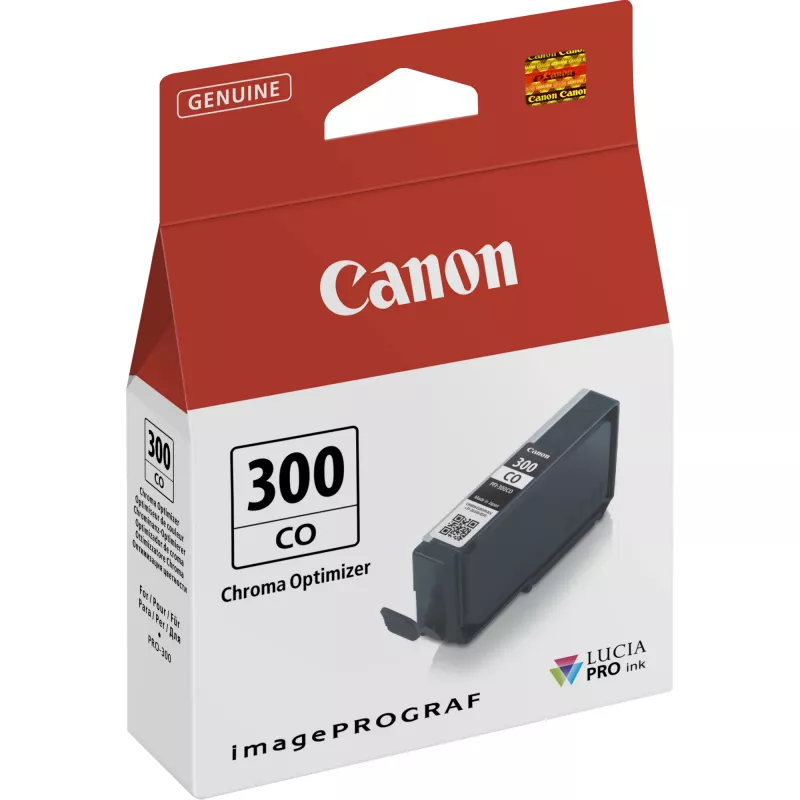
Cartuccia d'inchiostro Canon PFI-300CO Chroma Optimiser

Cartuccia d'inchiostro Canon PFI-300CO Chroma Optimiser
24,79 €
The Chroma Optimiser clear ink improves surface gloss uniformity, expands the colour gamut and deepens black tones. Applied over pigmented inks, it reduces diffuse reflection to reproduce more accurate colours and achieves a smoother finish on glossy and semi-gloss papers. When used correctly, the i... Leggi di più
Stock 39 Codice 26417 Marca Canon Modello 4201C001 Garanzia 2 anni

Spedizioni e resi

Consegna stimata Venerdì, Ottobre 16
Ti terremo aggiornato tramite il nostro sistema di tracciamento dettagliato
Opzioni di pagamento
Carta di credito/debitoVisaMastercardPayPalApple PayGoogle PayBonifico bancario

The Chroma Optimiser clear ink improves surface gloss uniformity, expands the colour gamut and deepens black tones. Applied over pigmented inks, it reduces diffuse reflection to reproduce more accurate colours and achieves a smoother finish on glossy and semi-gloss papers. When used correctly, the ink minimises bronzing and controls unevenness in gloss for more consistent prints. Yield: up to 272 photos on 4x6” photo paper or up to 97 photos on A3 paper.

Advantages

Chroma Optimiser provides a more even gloss across the print surface, enhances colour reproduction and increases black density. It reduces bronzing on glossy media and helps produce consistent results when printing photos and colour images with pigmented inks.

Key specifications

  • Type: clear optimisation ink
  • Function: improves gloss uniformity and colour reproduction
  • Effect on blacks: deeper, more vivid blacks with reduced bronzing
  • Compatibility: applied over pigmented inks
  • Yield examples: up to 272 photos (4x6”), up to 97 photos (A3)

How to use

Apply the Chroma Optimiser as a clear overprint layer following the printer manufacturer’s instructions for pigmented ink workflows. Use it when printing on glossy or semi-gloss photo papers to achieve a smooth, even gloss and improved black density. Allow prints to dry according to media and printer recommendations before handling or finishing.

Recommendations

For best results, test the Chroma Optimiser with your specific paper and printer settings to balance gloss and colour output; verify drying times and handling instructions provided by the printer manufacturer.
Punti salienti
  • Chroma Optimiser absorbs adverse light reflection and controls reflection
  • Achieve uniform surface glossiness with Chroma Optimiser
  • Printing with Chroma Optimiser enables truer print colour
  • Prints up to 272 on 4x6” photo paper¹ or 97 photos on A3²
  • The LUCIA PRO inks offer accurate colour reproduction and enhanced print longevity. Prints can last approximately 200 years in a photo album, 80 years on display behind glass and 50 years without the glass
  • Genuine Canon Ink provides consistent and reliable performance
  • Return every ink and toner cartridge to be reused or recycled. It's free, easy and environmentally friendly
  • Original
  • Printing colours: Black
  • Supply type: Single pack
  • Black ink page yield: 272 pages
  • Black ink cartridges quantity: 1
  • Brand compatibility: Canon
  • 1 pc(s)
Specifiche
Codice Sistema Armonizzato (HS)
84439990
Colori di stampa
Black
Compatibilità
imagePROGRAF PRO-300
Marche compatibili
Canon
Paese di origine
Japan
Quantità cartucce inchiostro nero
1
Quantità per confezione
1 pc(s)
Resa pagine inchiostro nero
272 pages
Tipo
Original
Tipo di alimentazione
Single pack
Tipo di imballaggio
Box

Brochure

Apri documento
Storico prezzi degli ultimi 6 mesi
Cartuccia d'inchiostro Canon PFI-300CO Chroma Optimiser
Attuale
24,79 €
Minimo
22,56 €
Massimo
24,79 €
Variazione 24 h
+0,49 €   +2%
Settimana
+1,02 €   +4%
Mese
+2,18 €   +10%

Prodotti più popolari in questa categoria

Ciao, sono l'assistente AI di DistriNode. Posso aiutarti a trovare prodotti, confrontare le opzioni, creare preventivi in PDF o aprire richieste di assistenza.