
Account Contatti
Il tuo carrello
Spedizione DPD & FedEx
Serve aiuto? Chiedi all'AI

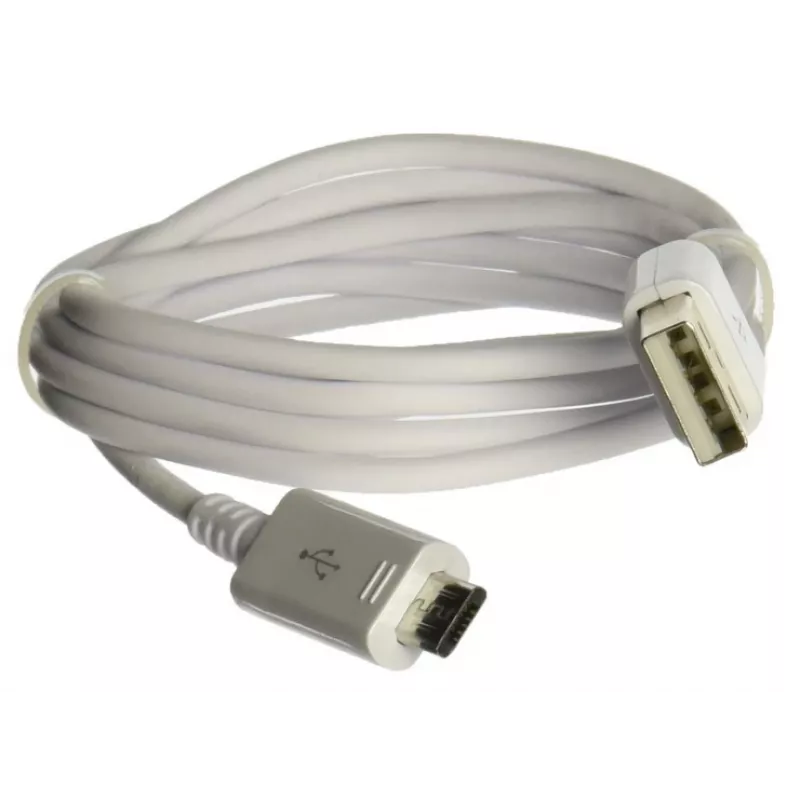
Cavo USB/microUSB Samsung cavo USB USB 2.0 0,9 m Micro-USB A USB A bianco

Cavo USB/microUSB Samsung cavo USB USB 2.0 0,9 m Micro-USB A USB A bianco
15,94 €
The Samsung USB Cable EP-DG925UWE Micro-USB A to USB A 0.9m in white is a compact cable designed for charging and data transfer between devices with a Micro-USB A port and standard USB A hosts. With a 0.9 meter length and USB 2.0 support, the cable is intended to provide reliable connections for syn... Leggi di più
Stock 204 Codice 1179867 Marca SAMSUNG Modello EP-DG925UWE Garanzia 2 anni

Spedizioni e resi

Consegna stimata Martedì, Ottobre 27
Ti terremo aggiornato tramite il nostro sistema di tracciamento dettagliato
Opzioni di pagamento
Carta di credito/debitoVisaMastercardPayPalApple PayGoogle PayBonifico bancario

The Samsung USB Cable EP-DG925UWE Micro-USB A to USB A 0.9m in white is a compact cable designed for charging and data transfer between devices with a Micro-USB A port and standard USB A hosts. With a 0.9 meter length and USB 2.0 support, the cable is intended to provide reliable connections for syncing, updating and powering compatible smartphones, tablets, accessories and peripheral devices.

Advantages

This Micro-USB A to USB A cable offers a straightforward male-to-male connection that supports USB 2.0 data transfer rates and charging. Its 0.9 m length balances reach and portability, and the white finish integrates cleanly with modern device setups. The cable’s standardized connectors ensure broad compatibility with devices that use Micro-USB A ports and with USB A chargers, power banks and computer ports.

Suitable for

  • Charging smartphones, tablets and small electronics with Micro-USB A ports
  • Data syncing between devices and a computer or laptop
  • Connecting accessories such as portable speakers, power banks and older peripherals

Key specifications

  • Connector type (one end): Micro-USB A
  • Connector type (other end): USB A (male)
  • USB version: USB 2.0
  • Cable length: 0.9 m
  • Color: White

How to use

Insert the Micro-USB A connector into the device’s Micro-USB A port and the USB A connector into a compatible charger, computer USB port or power bank. When connected to a power source, the cable will allow charging; when connected to a computer, it will enable data transfer according to USB 2.0 speeds. Ensure both connectors are fully seated to maintain a stable electrical and data connection. Disconnect by gently pulling the plug rather than the cable to avoid strain.

Recommendations

For consistent performance, avoid sharp bends near the connectors, keep the cable away from extreme heat sources, and store it coiled loosely when not in use. If fast charging is required, use with a charger compatible with the device’s charging profile; note that actual charging speed depends on the connected device and charger capabilities.

Punti salienti
  • Charging smartphones, tablets and small electronics with Micro-USB A ports
  • Data syncing between devices and a computer or laptop
  • Connecting accessories such as portable speakers, power banks and older peripherals
  • Connector type (one end): Micro-USB A
  • Connector type (other end): USB A (male)
  • USB version: USB 2.0
  • Cable length: 0.9 m
  • Color: White
Specifiche
Colore del prodotto
White
Connettore 1
Micro-USB A
Connettore 1 maschio/femmina
Male
Connettore 2
USB A
Connettore 2 maschio/femmina
Male
Connettore maschio/femmina
Male/Male
Lunghezza del cavo
0.9 m
Peso
0.85 kg
Prodotti compatibili
Galaxy S6, Galaxy S6 Edge
Versione USB
USB 2.0

Brochure

Apri documento
Storico prezzi degli ultimi 6 mesi
Cavo USB/microUSB Samsung cavo USB USB 2.0 0,9 m Micro-USB A USB A bianco
Attuale
15,94 €
Minimo
15,19 €
Massimo
15,94 €
Variazione 24 h
+0,75 €   +5%
Settimana
+0,62 €   +4%
Mese
+0,70 €   +5%

Prodotti più popolari in questa categoria

Ciao, sono l'assistente AI di DistriNode. Posso aiutarti a trovare prodotti, confrontare le opzioni, creare preventivi in PDF o aprire richieste di assistenza.