Account Contatti
Il tuo carrello
Spedizione DPD & FedEx
Serve aiuto? Chiedi all'AI

Dock universale Lenovo ThinkPad USB-C con cavo USB 3.2 Gen 1 (3.1 Gen 1) Type-C nero

Dock universale Lenovo ThinkPad USB-C con cavo USB 3.2 Gen 1 (3.1 Gen 1) Type-C nero
36 mesi
Dock universale Lenovo ThinkPad USB-C con cavo USB 3.2 Gen 1 (3.1 Gen 1) Type-C nero
159,66 €
Lenovo ThinkPad Universal USB-C Dock, Wired, USB 3.2 Gen 1 (3.1 Gen 1) Type-C, 10,100,1000 Mbit/s, Black, 4K Ultra HD, 3840 x 2160 pixels One Dock. No Limits. Engineered for performance and productivity, the ThinkPad Universal USB-C Dock is compatible with most Windows 10 an... Leggi di più
Stock 50 Codice 26958 Marca LENOVO Modello 40AY0090EU Garanzia 3 anni

Spedizioni e resi

Consegna stimata Mercoledì, Ottobre 28
Ti terremo aggiornato tramite il nostro sistema di tracciamento dettagliato
Opzioni di pagamento
Carta di credito/debitoVisaMastercardPayPalApple PayGoogle PayBonifico bancario

Lenovo ThinkPad Universal USB-C Dock, Wired, USB 3.2 Gen 1 (3.1 Gen 1) Type-C, 10,100,1000 Mbit/s, Black, 4K Ultra HD, 3840 x 2160 pixels
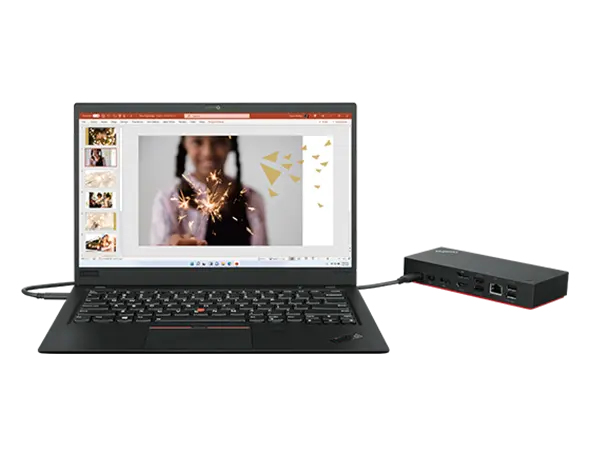
One Dock. No Limits.

One Dock. No Limits.

Engineered for performance and productivity, the ThinkPad Universal USB-C Dock is compatible with most Windows 10 and above USB-C notebooks2. Ideal for both office-based and remote working, it’s an IT manager’s dream—critical firmware updates are installed automatically and traditional IT tools, such as PXE boot, WOL, and MAC Address Pass Through, are also supported.

One Cable. No Hassle.

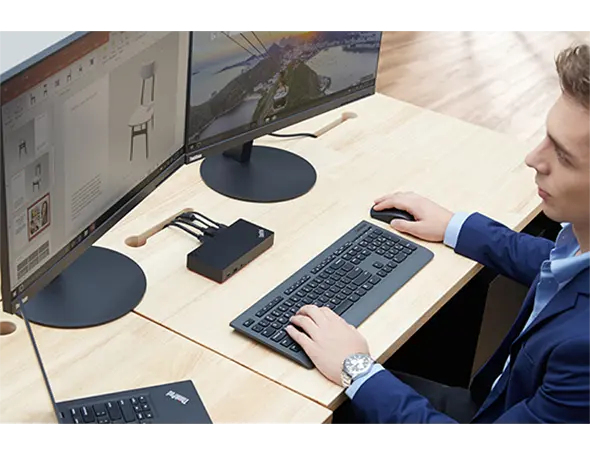
With the convenience of 11+ ports, including DisplayPort™ and HDMI™, the ThinkPad Universal USB-C Dock gives you exceptional versatility. It lets you savour blazing-fast data transfers, rapidly charge USB-C notebooks, and plug and play displays and other PC accessories. What’s more, this advanced onecable docking solution gives you more desk-space to work and play with.
One Cable. No Hassle.
One Remote Workforce. No Problem.

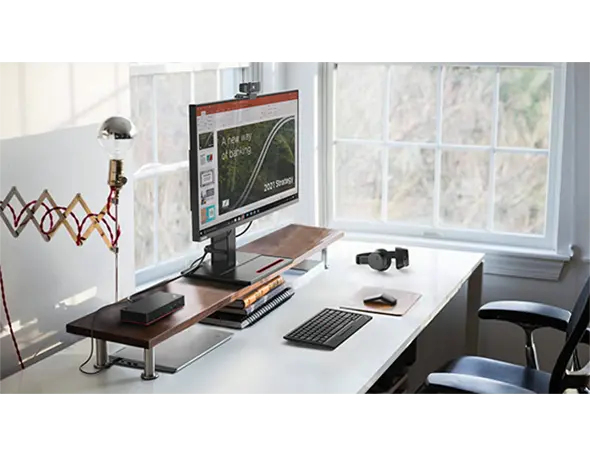
One Remote Workforce. No Problem.

Remote dock management just got a whole lot smarter. Thanks to Dock Manager and our latest hardware, firmware updates can be done without any end-user interruption, which means productivity is never compromised

How to use

Connect the dock to a compatible notebook using the USB-C cable. Attach peripherals such as monitors, keyboard, mouse and Ethernet cable to the corresponding ports. Ensure the notebook supports USB-C power delivery and video output if you require charging and external display functionality. For fleet deployments, register the dock with your management tools to enable remote firmware updates and IT features.

Recommendations

Use a notebook that supports USB-C power delivery and video-over-USB-C for full functionality. For best display performance keep monitor cables and firmware up to date; IT administrators should verify PXE, WOL and MAC pass-through compatibility with connected notebook models before large-scale rollout.

Punti salienti
  • Office desktops and hot-desk environments
  • IT-managed fleets requiring remote updates and PXE/WOL support
  • Users who need multiple peripherals, wired network and external displays
  • Interface: USB 3.2 Gen 1 Type-C (wired)
  • Power delivery: dynamic charging up to 100 W
  • Ethernet: 10/100/1000 Mbit/s (RJ-45)
  • Video output: supports up to 4K UHD (3840 x 2160)
  • USB ports: USB 3.2 Gen 2 Type-A x3, USB 2.0 x2, HDMI x1
  • Colour: Black
  • Weight: 0.34 kg
Specifiche
Alimentatore
90 W
Altezza
30.8 mm
Altezza confezione
75 mm
Cavi inclusi
USB Type-C
Certificati di conformità
CE
Certificazione
FCC/ICES, KCC, RCM, BSMI, VCCI, CB, cULus, EAC, TUV- Mark, Kvalitet, LoA, Israel SII, DoC, NOM
Codice Sistema Armonizzato (HS)
84733020
Colore del prodotto
Black
Connettore di alimentazione
USB Type-C
Ethernet LAN
Yes
Ingresso microfono
No
Interfaccia host
USB 3.2 Gen 1 (3.1 Gen 1) Type-C
Interruttore on/off
Yes
Larghezza
171 mm
Larghezza confezione
210 mm
Lettore di schede integrato
No
Numero di display supportati
3
Numero di porte DisplayPort
2
Numero di porte HDMI
1
Numero di porte USB 2.0
2
Numero di porte USB 3.2 Gen 1 (3.1 Gen 1) Type-A
0
Numero di porte USB 3.2 Gen 1 (3.1 Gen 1) Type-C
1
Numero di porte USB 3.2 Gen 2 (3.1 Gen 2) Type-A
3
Peso
340 g
Peso confezione
955 g
Porta combo cuffie/microfono
Yes
Porte Ethernet LAN (RJ-45)
1
Profondità
80 mm
Profondità confezione
158 mm
Quantità per confezione
1 pc(s)
Risoluzione digitale massima
3840 x 2160 pixels
Sistemi operativi Windows supportati
Windows 10, Windows 7
Slot per cavo di sicurezza
Yes
Tecnologia di connettività
Wired
Temperatura di esercizio (T-T)
0 - 35 °C
Tipo di fonte di alimentazione
USB
Tipo di HD
4K Ultra HD
Tipo di slot per cavo di sicurezza
Kensington
Umidità relativa di esercizio (H-H)
20 - 95%
Uscite cuffie
0
Velocità di trasferimento Ethernet LAN
10,100,1000 Mbit/s

Manuale

Apri documento

Brochure

Apri documento
Storico prezzi degli ultimi 6 mesi
Dock universale Lenovo ThinkPad USB-C con cavo USB 3.2 Gen 1 (3.1 Gen 1) Type-C nero
Attuale
159,66 €
Minimo
150,18 €
Massimo
163,69 €
Variazione 24 h
+0,68 €   +0%
Settimana
+0,26 €   +0%
Mese
+4,08 €   +3%

Prodotti più popolari in questa categoria

Ciao, sono l'assistente AI di DistriNode. Posso aiutarti a trovare prodotti, confrontare le opzioni, creare preventivi in PDF o aprire richieste di assistenza.