
Account Contatti
Il tuo carrello
Spedizione DPD & FedEx
Serve aiuto? Chiedi all'AI

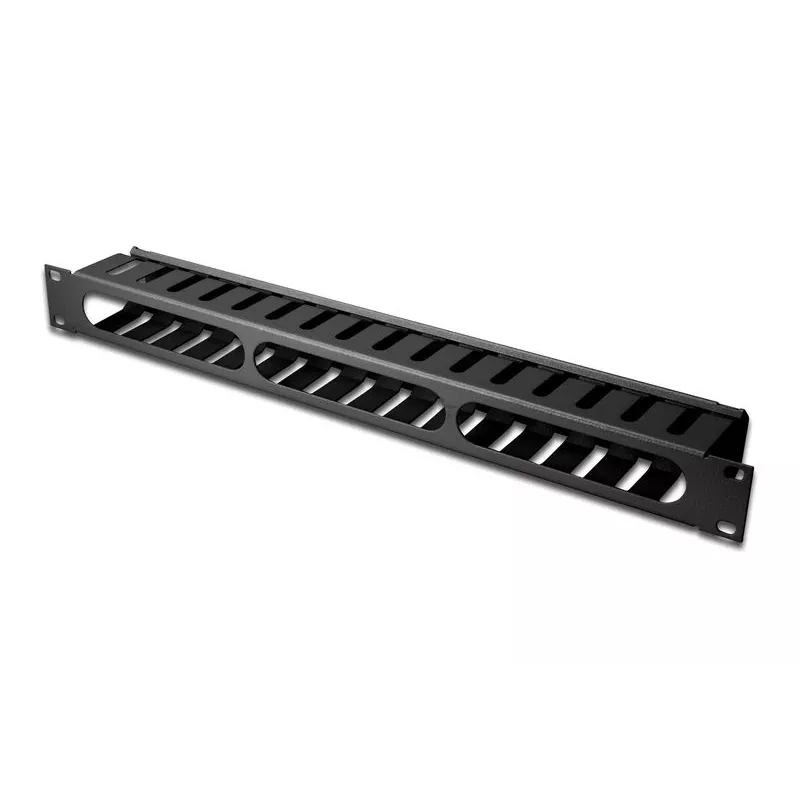
Equip Pannello di gestione cavi per montaggio rack 19", Nero

Equip Pannello di gestione cavi per montaggio rack 19
Equip Pannello di gestione cavi per montaggio rack 19", Nero
18,75 €
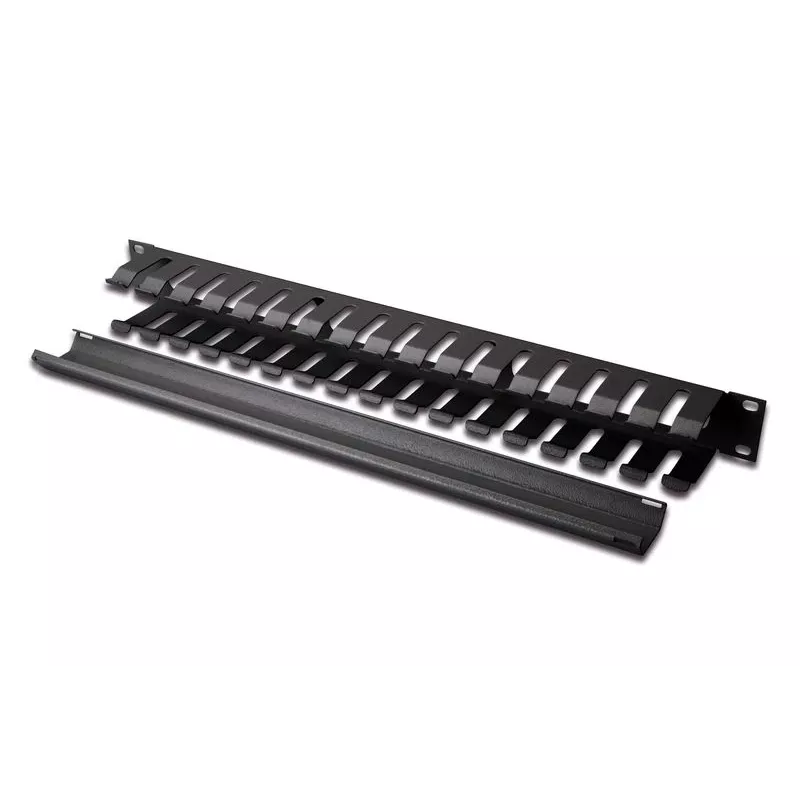
The Equip 19" Rack Mount Cable Management Panel is a metal panel designed to organize cable routing and connections in datacom and networking environments. Finished in black and constructed from durable steel, the panel helps keep server racks tidy, reduces cable tangling and supports improved airfl... Leggi di più
Stock 100 Codice 124676 Marca EQUIP Modello 327313 Garanzia 2 anni

Spedizioni e resi

Consegna stimata Venerdì, Ottobre 16
Ti terremo aggiornato tramite il nostro sistema di tracciamento dettagliato
Opzioni di pagamento
Carta di credito/debitoVisaMastercardPayPalApple PayGoogle PayBonifico bancario

The Equip 19" Rack Mount Cable Management Panel is a metal panel designed to organize cable routing and connections in datacom and networking environments. Finished in black and constructed from durable steel, the panel helps keep server racks tidy, reduces cable tangling and supports improved airflow. Dimensions are 485 mm height, 70 mm width and 44.5 mm depth. Each pack contains one panel.

Advantages

The sturdy steel construction provides long-term durability while the black finish offers a neutral appearance that fits standard 19" rack installations. The panel’s compact 485 x 70 x 44.5 mm size allows installation in server cabinets and network racks without occupying excessive space. Using a dedicated cable management panel simplifies identification and routing of network and power cables.

Suitable for

  • Server racks and network cabinets
  • Datacom rooms and wiring closets
  • IT closets in offices and small data centers
  • Organizing Ethernet, power and patch cables

Key specifications

  • Brand: EQUIP
  • Model / MPN: 327313
  • EAN: 4015867226384
  • Product colour: Black
  • Material: Steel
  • Mounting: 19" rack mount
  • Dimensions (H×W×D): 485 × 70 × 44.5 mm
  • Qty per pack: 1 panel

How to use

Mount the panel in a standard 19" rack position using appropriate rack screws and cage nuts. Route network and power cables along the panel openings and secure them with cable ties or Velcro straps as needed. Ensure cables are not bent beyond their minimum bend radius and avoid over-tightening ties to prevent damage. Position the panel to separate cable types for clearer routing and easier maintenance.

Recommendations

For best results, install the panel near patch panels or switch ports to keep patch cables short. Use labelled ties or colour-coded markers to simplify identification during maintenance and avoid mixing high-voltage power cables with data cables in the same bundle to reduce interference.

Punti salienti
  • Server racks and network cabinets
  • Datacom rooms and wiring closets
  • IT closets in offices and small data centers
  • Organizing Ethernet, power and patch cables
  • Brand: EQUIP
  • Model / MPN: 327313
  • EAN: 4015867226384
  • Product colour: Black
  • Material: Steel
  • Mounting: 19" rack mount
  • Dimensions (H×W×D): 485 × 70 × 44.5 mm
  • Qty per pack: 1 panel
Specifiche
Altezza
485 mm
Altezza confezione
485 mm
Capacità rack
1U
Codice Sistema Armonizzato (HS)
85389099
Colore del prodotto
Black
Larghezza
70 mm
Larghezza confezione
80 mm
Materiale della scocca
Steel
Paese di origine
China
Peso
600 g
Profondità
44.5 mm
Profondità confezione
50 mm
Quantità per confezione
1 pc(s)
Tipo
Cable management panel

Brochure

Apri documento
Storico prezzi degli ultimi 6 mesi
Equip Pannello di gestione cavi per montaggio rack 19", Nero
Attuale
18,75 €
Minimo
17,68 €
Massimo
23,24 €
Variazione 24 h
+1,00 €   +6%
Settimana
+1,04 €   +6%
Mese
+1,07 €   +6%

Prodotti più popolari in questa categoria

Ciao, sono l'assistente AI di DistriNode. Posso aiutarti a trovare prodotti, confrontare le opzioni, creare preventivi in PDF o aprire richieste di assistenza.