
Account Contatti
Il tuo carrello
Spedizione DPD & FedEx
Serve aiuto? Chiedi all'AI

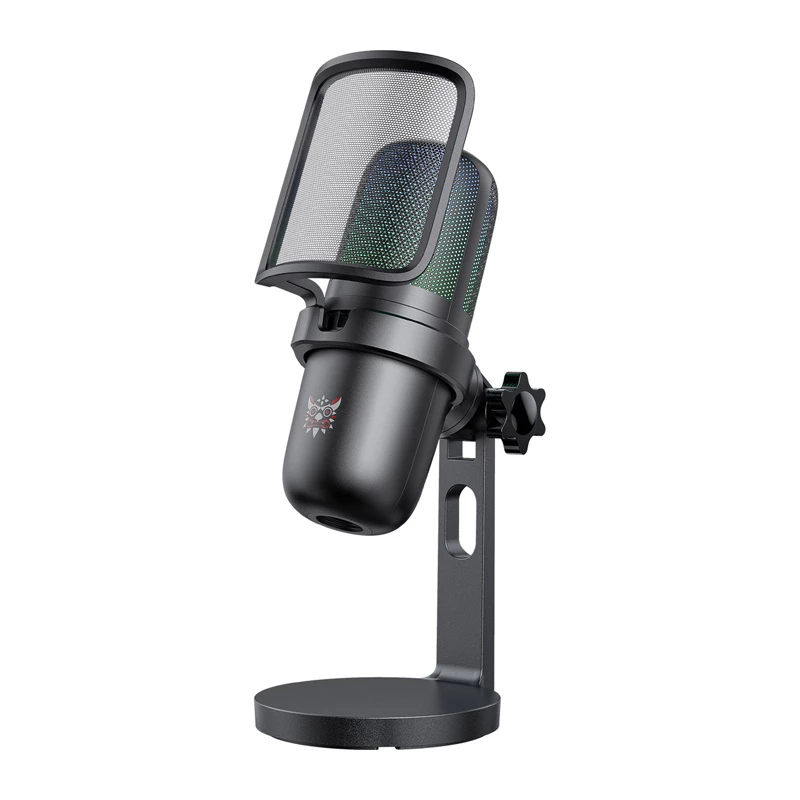
Microfono Onikuma M-730 RGB (nero) — microfono da gaming USB/PC con illuminazione RGB

Microfono Onikuma M-730 RGB (nero) — microfono da gaming USB/PC con illuminazione RGB
30,85 €
Onikuma M-730 RGB (black) is a desktop USB gaming microphone with integrated RGB lighting. It is designed for plug-and-play use on computers, providing a stationary hands-free solution for streaming, voice chat, podcasting and online gaming. The compact desktop form factor occupies minimal space whi... Leggi di più
Stock 20 Codice 1719413 Marca ONIKUMA Modello M-730 black Garanzia 2 anni

Spedizioni e resi

Consegna stimata Venerdì, Ottobre 16
Ti terremo aggiornato tramite il nostro sistema di tracciamento dettagliato
Opzioni di pagamento
Carta di credito/debitoVisaMastercardPayPalApple PayGoogle PayBonifico bancario

Onikuma M-730 RGB (black) is a desktop USB gaming microphone with integrated RGB lighting. It is designed for plug-and-play use on computers, providing a stationary hands-free solution for streaming, voice chat, podcasting and online gaming. The compact desktop form factor occupies minimal space while RGB illumination allows visual customization. USB connectivity ensures simple setup and compatibility with most Windows and macOS systems without needing an external audio interface.

Advantages

The Onikuma M-730 RGB features straightforward USB connectivity and a stable desktop form factor that keeps the microphone visible and secure on a desk. Integrated RGB lighting offers aesthetic customization to match a gaming setup. Its plug-and-play design reduces setup time and typically requires no additional drivers for basic operation. The black finish provides a neutral appearance that fits a wide range of setups.

Suitable for

  • Live streaming on PC
  • Voice chat in multiplayer games
  • Podcasting and voice recording
  • Online meetings and calls
  • Content creation for social platforms

Key specifications

  • Brand: Onikuma
  • Model: M-730 RGB (black)
  • Interface: USB (plug-and-play)
  • Intended use: PC / gaming / desktop
  • Lighting: Integrated RGB lighting
  • Form factor: Desktop microphone
  • MPN: M-730 black
  • EAN: 6972470562668

How to use

Place the Onikuma M-730 RGB on a stable, flat surface near your computer and connect it to an available USB port using the supplied cable. The operating system should recognise the device automatically; then select it as the input device in system sound settings or in the audio settings of your streaming, VOIP or recording application. Adjust the microphone position and RGB lighting to suit your workspace, keep a consistent distance between mouth and microphone, and minimise background noise for clearer recording.

Recommendations

Use the microphone in a quiet room and place it on a vibration-free surface to improve voice clarity. Set the Onikuma M-730 RGB as the default input in your software before starting and test levels briefly to avoid clipping. Dim or turn off strong ambient lights for video while keeping the RGB lighting if a matching appearance is desired.

Punti salienti
  • Live streaming on PC
  • Voice chat in multiplayer games
  • Podcasting and voice recording
  • Online meetings and calls
  • Content creation for social platforms
  • Brand: Onikuma
  • Model: M-730 RGB (black)
  • Interface: USB (plug-and-play)
  • Intended use: PC / gaming / desktop
  • Lighting: Integrated RGB lighting
  • Form factor: Desktop microphone
  • MPN: M-730 black
  • EAN: 6972470562668
Specifiche
Peso
0.5 kg
Storico prezzi degli ultimi 6 mesi
Microfono Onikuma M-730 RGB (nero) — microfono da gaming USB/PC con illuminazione RGB
Attuale
30,85 €
Minimo
30,30 €
Massimo
38,52 €
Variazione 24 h
+0,55 €   +2%
Settimana
+0,13 €   +0%
Mese
+0,17 €   +1%

Prodotti più popolari in questa categoria

Ciao, sono l'assistente AI di DistriNode. Posso aiutarti a trovare prodotti, confrontare le opzioni, creare preventivi in PDF o aprire richieste di assistenza.