
Account Contatti
Il tuo carrello
Spedizione DPD & FedEx
Serve aiuto? Chiedi all'AI

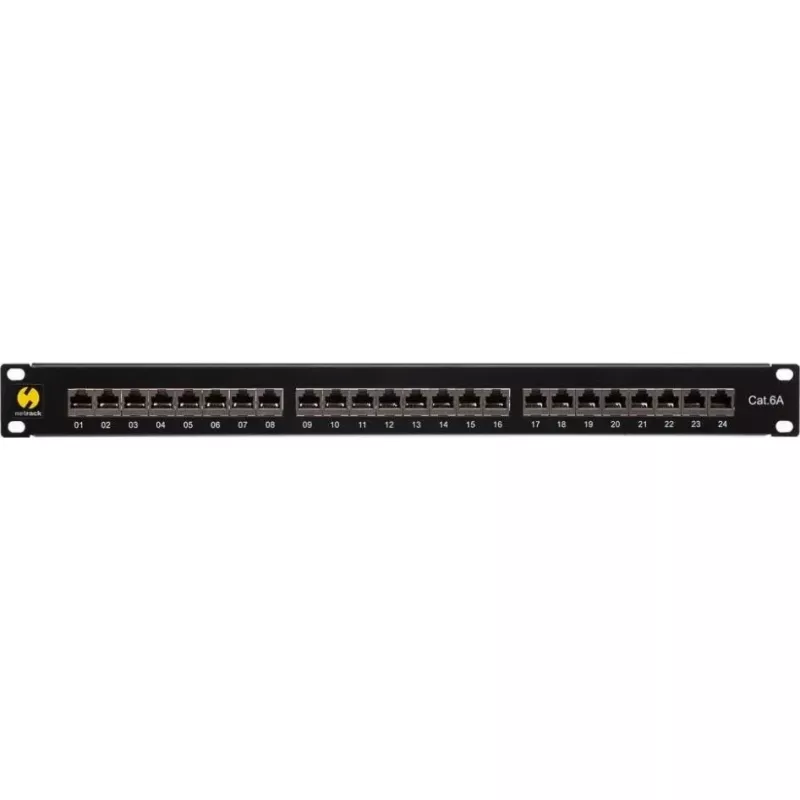
Patch panel NETRACK 104-19 19 pollici 24 porte per montaggio a rack

Patch panel NETRACK 104-19 19 pollici 24 porte per montaggio a rack
63,80 €
NETRACK 104-19 19" 24-port rack-mounted patch panel is designed for structured Ethernet cabling in server rooms, network cabinets and communication closets. The panel fits standard 19-inch racks and provides 24 front-facing ports for organized connection points. It supports common termination method... Leggi di più
Stock EsauritoNon disponibile Codice 2574848 Marca NETRACK Modello 104-19 Garanzia 2 anni

Spedizioni e resi

NETRACK 104-19 19" 24-port rack-mounted patch panel is designed for structured Ethernet cabling in server rooms, network cabinets and communication closets. The panel fits standard 19-inch racks and provides 24 front-facing ports for organized connection points. It supports common termination methods and helps centralize horizontal cabling, making rack-mounted installations neater and easier to maintain.

Advantages

The patch panel offers a compact 1U profile with 24 ports to consolidate multiple cable terminations in a single, rack-mounted unit. Front access ports simplify patching and troubleshooting, while rear wiring accommodates punch-down or keystone style terminations depending on installer preference. Built from durable materials, the panel provides consistent port alignment and labeling space to help maintain an orderly cabling infrastructure.

Suitable for

  • Server rooms and data centers requiring organized horizontal cabling termination
  • Network cabinets and wall-mounted racks in offices and telecommunication rooms
  • IT closets where centralized patching and frequent moves/adds/changes occur
  • Structured cabling projects using standard RJ45 Ethernet cabling

Key specifications

  • Form factor: 19-inch, rack-mounted, 1U height
  • Number of ports: 24 RJ45-compatible front ports
  • Termination options: compatible with punch-down or keystone terminations
  • Material and finish: metal chassis with protective coating for grounding and durability
  • Port labeling: front panel space for port identification and numbering

How to use

Mount the patch panel into a standard 19-inch rack using appropriate rack screws and cage nuts for a secure 1U installation. Route horizontal cables to the rear of the panel and terminate each conductor pair using the chosen method—punch-down block or keystone jacks—following T568A or T568B wiring standards. After termination, verify continuity and pair wiring with a cable tester, then connect patch cords to the front ports to link devices or switches to the structured cabling backbone.

Recommendations

For reliable performance, maintain proper bend radius on incoming cables, use strain relief or cable managers behind the panel, and clearly label each port. Select termination method consistent with existing infrastructure and test all links after installation to confirm correct wiring and signal integrity.

Punti salienti
  • Server rooms and data centers requiring organized horizontal cabling termination
  • Network cabinets and wall-mounted racks in offices and telecommunication rooms
  • IT closets where centralized patching and frequent moves/adds/changes occur
  • Structured cabling projects using standard RJ45 Ethernet cabling
  • Form factor: 19-inch, rack-mounted, 1U height
  • Number of ports: 24 RJ45-compatible front ports
  • Termination options: compatible with punch-down or keystone terminations
  • Material and finish: metal chassis with protective coating for grounding and durability
  • Port labeling: front panel space for port identification and numbering
Specifiche
Colore del prodotto
Black
Lo storico prezzi non è ancora disponibile
Stiamo ancora raccogliendo dati giornalieri sufficienti sui prezzi per questo prodotto.

Prodotti più popolari in questa categoria

Ciao, sono l'assistente AI di DistriNode. Posso aiutarti a trovare prodotti, confrontare le opzioni, creare preventivi in PDF o aprire richieste di assistenza.