
Account Contatti
Il tuo carrello
Spedizione DPD & FedEx
Serve aiuto? Chiedi all'AI

QNAP SP-TS-TRAY-WOLOCK accessorio per rack

QNAP SP-TS-TRAY-WOLOCK accessorio per rack
30,02 €
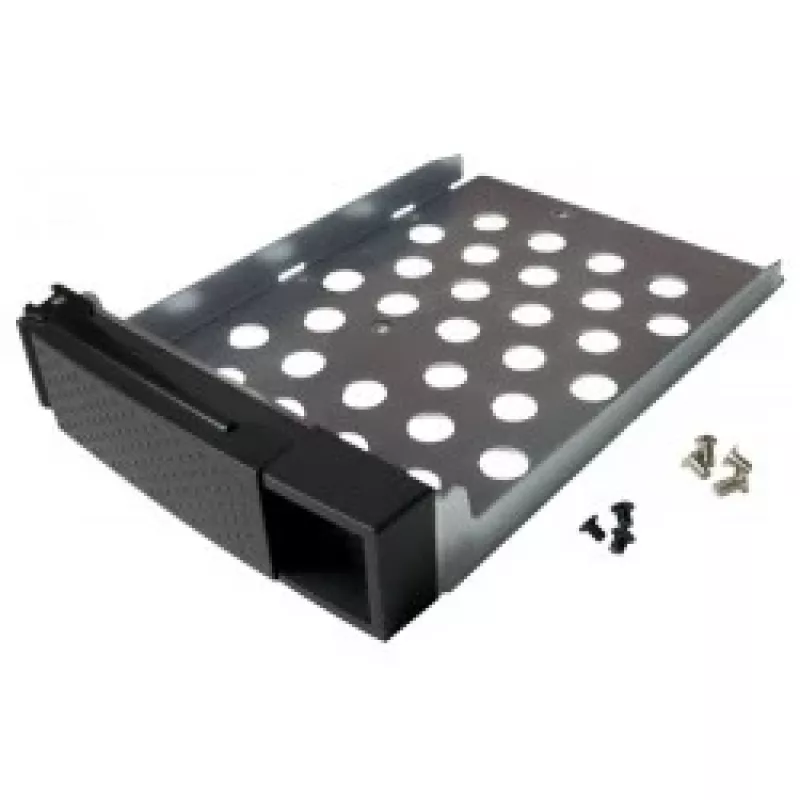
The QNAP SP-TS-TRAY-WOLOCK is a black rack accessory tray designed for use with QNAP TS-119P+, TS-219P+, TS-419P+, and TS-419P II models. It measures 3.5 inches (8.89 cm) in drive size with overall dimensions of 140 mm width and 181 mm depth, and includes mounting screws for both 2.5" and 3.5" hard ... Leggi di più
Stock 2 Codice 120517 Marca QNAP Modello SP-TS-TRAY-WOLOCK Garanzia 2 anni

Spedizioni e resi

Consegna stimata Giovedì, Ottobre 22
Ti terremo aggiornato tramite il nostro sistema di tracciamento dettagliato
Opzioni di pagamento
Carta di credito/debitoVisaMastercardPayPalApple PayGoogle PayBonifico bancario

The QNAP SP-TS-TRAY-WOLOCK is a black rack accessory tray designed for use with QNAP TS-119P+, TS-219P+, TS-419P+, and TS-419P II models. It measures 3.5 inches (8.89 cm) in drive size with overall dimensions of 140 mm width and 181 mm depth, and includes mounting screws for both 2.5" and 3.5" hard drives to simplify installation and organization in compatible QNAP enclosures.

Advantages

This tray is finished in black for visual consistency with rack equipment and comes with six black flat-head machine screws for 2.5" HDDs and eight silver flat-head machine screws for 3.5" HDDs. It provides a compact, model-specific mounting solution that fits the listed TS-series QNAP units and helps secure drives reliably within the enclosure.

Suitable for

  • Mounting 2.5" hard drives in QNAP TS-119P+/219P+/419P+/419P II
  • Mounting 3.5" hard drives in QNAP TS-119P+/219P+/419P+/419P II
  • Replacing or organizing drive trays in compatible QNAP network storage units

Key specifications

  • Model: QNAP SP-TS-TRAY-WOLOCK
  • Compatible models: TS-119P+, TS-219P+, TS-419P+, TS-419P II
  • Drive size: 3.5" (8.89 cm)
  • Dimensions: 140 mm (W) x 181 mm (D)
  • Included screws: 6 × black flat-head machine screws for 2.5" HDD, 8 × silver flat-head machine screws for 3.5" HDD
  • Color: Black
  • Brand: QNAP
  • MPN: SP-TS-TRAY-WOLOCK
  • EAN: 4712511121889

How to use

Install the tray into a compatible QNAP TS-series bay according to the NAS service manual. Position the 2.5" or 3.5" drive in the tray, align the screw holes, and secure the drive using the supplied flat-head machine screws (use the black screws for 2.5" drives and the silver screws for 3.5" drives). Slide or fasten the tray into the enclosure until it locks into place as described for your specific QNAP model.

Recommendations

Use the tray only with the listed QNAP TS-119P+/219P+/419P+/419P II models to ensure proper fit; follow the NAS manufacturer’s instructions for drive installation and handling. Keep screws tightened to prevent drive movement but avoid overtightening to prevent damage to drive housings.
Punti salienti
  • Mounting 2.5" hard drives in QNAP TS-119P+/219P+/419P+/419P II
  • Mounting 3.5" hard drives in QNAP TS-119P+/219P+/419P+/419P II
  • Replacing or organizing drive trays in compatible QNAP network storage units
  • Model: QNAP SP-TS-TRAY-WOLOCK
  • Compatible models: TS-119P+, TS-219P+, TS-419P+, TS-419P II
  • Drive size: 3.5" (8.89 cm)
  • Dimensions: 140 mm (W) x 181 mm (D)
  • Included screws: 6 × black flat-head machine screws for 2.5" HDD, 8 × silver flat-head machine screws for 3.5" HDD
  • Color: Black
  • Brand: QNAP
  • MPN: SP-TS-TRAY-WOLOCK
  • EAN: 4712511121889
Specifiche
Altezza
40 mm
Codice Sistema Armonizzato (HS)
85389099
Colore del prodotto
Black
Compatibilità
TS-119P+/219P+/419P+/419P II
Dimensioni (pollici)
8.89 cm (3.5")
Larghezza
140 mm
Peso
200 g
Profondità
181 mm

Brochure

Apri documento
Storico prezzi degli ultimi 6 mesi
QNAP SP-TS-TRAY-WOLOCK accessorio per rack
Attuale
30,02 €
Minimo
18,42 €
Massimo
31,59 €
Variazione 24 h
+0,49 €   +2%
Settimana
+11,54 €   +62%
Mese
+11,59 €   +63%

Prodotti più popolari in questa categoria

Ciao, sono l'assistente AI di DistriNode. Posso aiutarti a trovare prodotti, confrontare le opzioni, creare preventivi in PDF o aprire richieste di assistenza.