
Account Contatti
Il tuo carrello
Spedizione DPD & FedEx
Serve aiuto? Chiedi all'AI

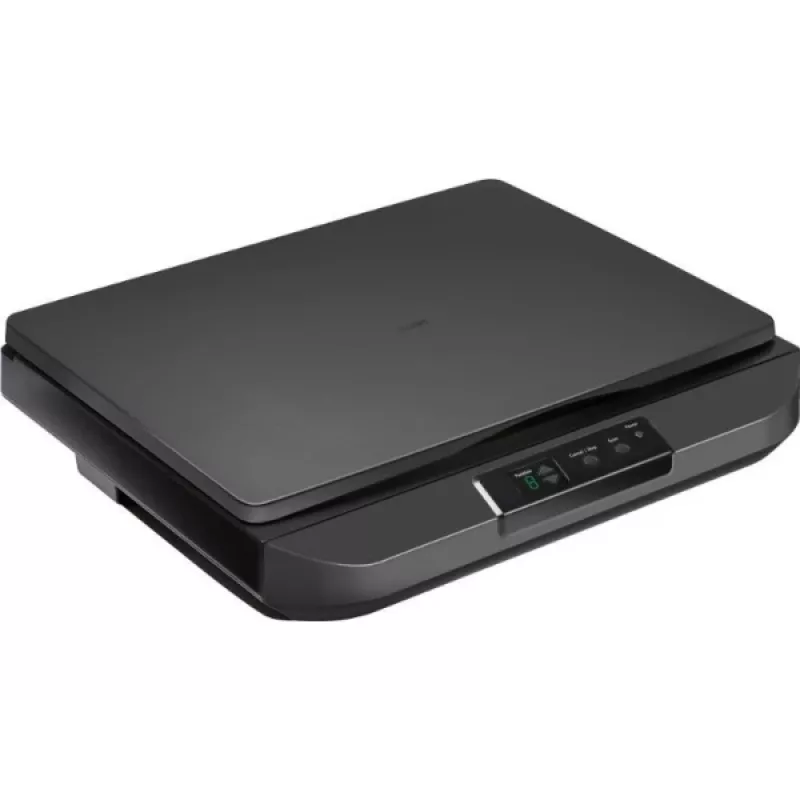
Scanner piano fisso Avision FB5100 A3 600 dpi USB

Scanner piano fisso Avision FB5100 A3 600 dpi USB
465,75 €
Avision FB5100 A3 600 dpi USB is a flatbed scanner designed to capture high-resolution digital images from books, large-format documents, photographs and artwork. The device supports A3 document size and offers an optical resolution up to 600 dpi with USB connectivity for direct connection to a comp... Leggi di più
Stock 4 Codice 1163520 Marca AVISION Modello 000-1129-02G Garanzia 2 anni

Spedizioni e resi

Consegna stimata Martedì, Ottobre 20
Ti terremo aggiornato tramite il nostro sistema di tracciamento dettagliato
Opzioni di pagamento
Carta di credito/debitoVisaMastercardPayPalApple PayGoogle PayBonifico bancario

Avision FB5100 A3 600 dpi USB is a flatbed scanner designed to capture high-resolution digital images from books, large-format documents, photographs and artwork. The device supports A3 document size and offers an optical resolution up to 600 dpi with USB connectivity for direct connection to a computer. It is intended for environments that require accurate reproduction of larger originals, such as offices, schools and creative studios.

Advantages

The scanner delivers detailed scans up to 600 dpi, providing sufficient clarity for archiving, printing and basic image editing. Its A3 flatbed surface accommodates larger originals without the need for multi-pass stitching. USB connectivity ensures simple setup and stable data transfer to a connected PC. The device's flatbed design enables safe handling of bound materials and delicate originals while minimizing mechanical stress during digitization.

Suitable for

  • Digitizing books, magazines and bound documents
  • Scanning large-format documents, posters and maps
  • Capturing photographs, artworks and prints for archiving
  • Office workflows that require occasional A3 scans

Key specifications

  • Maximum optical resolution: 600 dpi
  • Maximum scan area: A3 size
  • Interface: USB connection for data transfer
  • Device type: Flatbed scanner suitable for delicate and bound originals
  • Image output: Color and monochrome scanning capability

How to use

Place the original face-down on the flatbed glass aligned to the indicated guides. Connect the scanner to a computer using the USB cable and install any required drivers or scanning software supplied by the manufacturer. Use the scanning software to select resolution (up to 600 dpi), color mode and target file format, then preview and perform the final scan. For bound materials, position the spine away from the scanning area and hold pages flat without applying excessive pressure to avoid damage.

Recommendations

For consistent results, clean the scanner glass regularly with a lint-free cloth and manufacturer-recommended cleaner, select 300–600 dpi depending on the intended use (300 dpi for general document archiving, 600 dpi for high-detail images), and store scanned files in organized folders with descriptive filenames and appropriate file formats (PDF for documents, TIFF/JPEG for images).

Punti salienti
  • Digitizing books, magazines and bound documents
  • Scanning large-format documents, posters and maps
  • Capturing photographs, artworks and prints for archiving
  • Office workflows that require occasional A3 scans
  • Maximum optical resolution: 600 dpi
  • Maximum scan area: A3 size
  • Interface: USB connection for data transfer
  • Device type: Flatbed scanner suitable for delicate and bound originals
  • Image output: Color and monochrome scanning capability
Specifiche
Display integrato
No
Storico prezzi degli ultimi 6 mesi
Scanner piano fisso Avision FB5100 A3 600 dpi USB
Attuale
465,75 €
Minimo
462,96 €
Massimo
715,18 €
Variazione 24 h
+0,56 €   +0%
Settimana
-0,42 €   0%
Mese
+0,37 €   +0%

Prodotti più popolari in questa categoria

Ciao, sono l'assistente AI di DistriNode. Posso aiutarti a trovare prodotti, confrontare le opzioni, creare preventivi in PDF o aprire richieste di assistenza.