
Account Contatti
Il tuo carrello
Spedizione DPD & FedEx
Serve aiuto? Chiedi all'AI

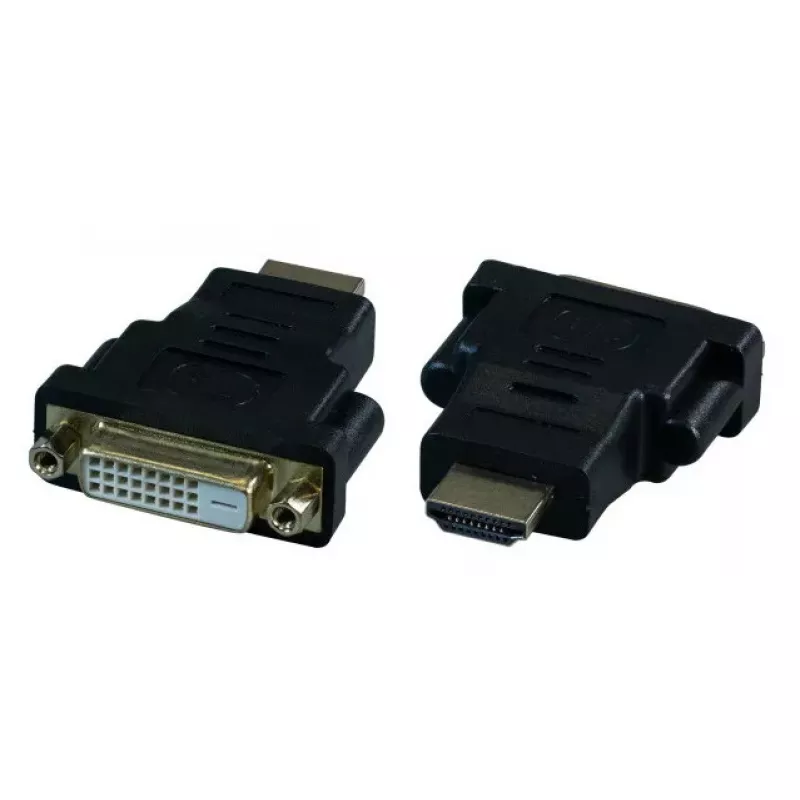
Scheda adattatore di interfaccia EFB Elektronik EB470V2 — ingresso HDMI verso uscita DVI-D, nero

Scheda adattatore di interfaccia EFB Elektronik EB470V2 — ingresso HDMI verso uscita DVI-D, nero
14,75 €
EFB Elektronik EB470V2 is an interface adapter card that accepts an HDMI host input and provides a DVI‑D output. The unit comes in black and is designed for connecting HDMI sources to DVI‑D displays or capture devices. It is intended for AV installations, monitor connections and setups that require ... Leggi di più
Stock 450 Codice 2567787 Marca EFB ELEKTRONIK Modello EB470V2 Garanzia 2 anni

Spedizioni e resi

Consegna stimata Venerdì, Ottobre 30
Ti terremo aggiornato tramite il nostro sistema di tracciamento dettagliato
Opzioni di pagamento
Carta di credito/debitoVisaMastercardPayPalApple PayGoogle PayBonifico bancario

EFB Elektronik EB470V2 is an interface adapter card that accepts an HDMI host input and provides a DVI‑D output. The unit comes in black and is designed for connecting HDMI sources to DVI‑D displays or capture devices. It is intended for AV installations, monitor connections and setups that require simple conversion from HDMI to DVI‑D without additional signal processing.

Advantages

The adapter card converts an HDMI input signal to a DVI‑D output, enabling compatibility between devices that use these interfaces. Its compact card form factor and black finish make it suitable for integration into rack or enclosure environments where a discreet interface converter is needed. The device supports straightforward plug-and-play operation when used with compatible source and display hardware.

Suitable for

  • Connecting HDMI source devices to DVI‑D monitors or displays
  • Integration into AV racks or custom enclosures
  • Use with capture devices or recorders that accept DVI‑D input
  • Monitor replacement scenarios where only DVI‑D input is available

Key specifications

  • Input: HDMI host
  • Output: DVI‑D
  • Product colour: Black
  • Form factor: Interface adapter card

How to use

Install the adapter card in the intended enclosure or mounting position, ensuring the card is securely seated and accessible for cable connections. Connect the HDMI source to the adapter's HDMI input using a compatible HDMI cable, and connect the DVI‑D output to the display or capture device using an appropriate DVI‑D cable. Power and device-specific settings are managed by the connected equipment; the adapter performs the signal conversion between the two interfaces.

Recommendations

Use high-quality HDMI and DVI‑D cables and ensure that source and display devices support compatible video formats and resolutions. Verify device settings for output resolution and refresh rate to avoid signal mismatch. For installations in racks or enclosures, allow adequate ventilation and secure mounting to prevent stress on connectors.

Punti salienti
  • Connecting HDMI source devices to DVI‑D monitors or displays
  • Integration into AV racks or custom enclosures
  • Use with capture devices or recorders that accept DVI‑D input
  • Monitor replacement scenarios where only DVI‑D input is available
  • Input: HDMI host
  • Output: DVI‑D
  • Product colour: Black
  • Form factor: Interface adapter card
Specifiche
Colore del prodotto
Black
Interfaccia di uscita
DVI-D
Interfaccia host
HDMI
Interno
No
Storico prezzi degli ultimi 6 mesi
Scheda adattatore di interfaccia EFB Elektronik EB470V2 — ingresso HDMI verso uscita DVI-D, nero
Attuale
14,75 €
Minimo
3,39 €
Massimo
14,75 €
Variazione 24 h
+0,52 €   +4%
Settimana
+2,30 €   +18%
Mese
+1,22 €   +9%

Prodotti più popolari in questa categoria

Venditore: UAB KUR LT · Laisvės pr. 125A, LT-06118 Vilnius, Lituania · Codice società 303192950 · Partita IVA UE LT100008198612 · Spedizione dall'UE (Lituania)
Ciao, sono l'assistente AI di DistriNode. Posso aiutarti a trovare prodotti, confrontare le opzioni, creare preventivi in PDF o aprire richieste di assistenza.