
Account Contatti
Il tuo carrello
Spedizione DPD & FedEx
Serve aiuto? Chiedi all'AI

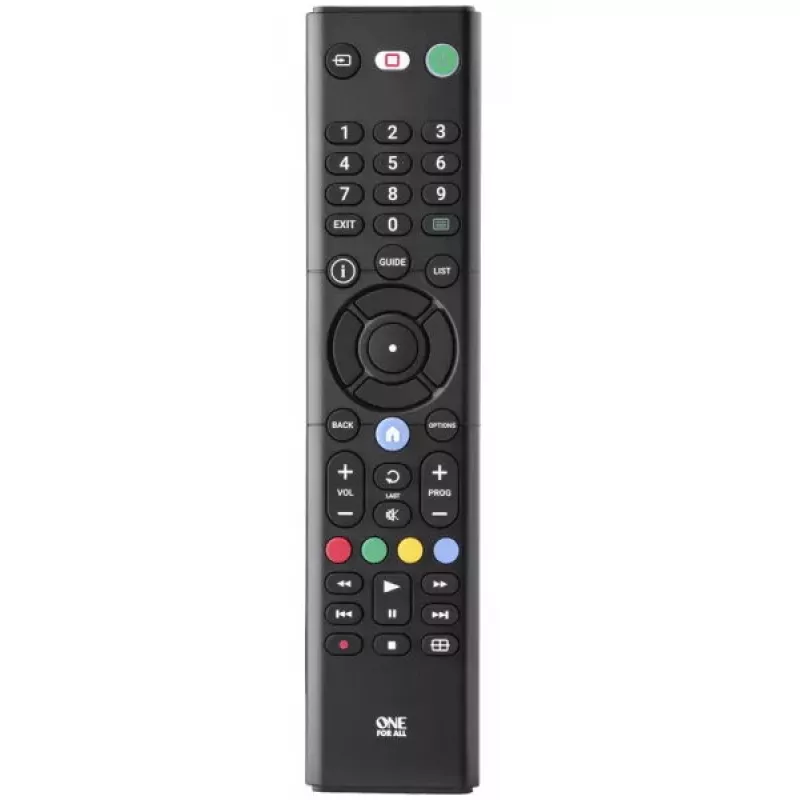
Telecomando TV di ricambio One For All URC1312 IR wireless a tasti Sony

Telecomando TV di ricambio One For All URC1312 IR wireless a tasti Sony
8,74 €
The One For All URC1312 IR Wireless Press Buttons Sony replacement remote is a universal control designed to operate Sony televisions using infrared (IR) signals. Its compact, black housing and tactile press-button interface provide straightforward, familiar operation for controlling power, volume, ... Leggi di più
Stock 9 Codice 2577700 Marca ONE FOR ALL Modello URC1312 Garanzia 2 anni

Spedizioni e resi

Consegna stimata Martedì, Ottobre 20
Ti terremo aggiornato tramite il nostro sistema di tracciamento dettagliato
Opzioni di pagamento
Carta di credito/debitoVisaMastercardPayPalApple PayGoogle PayBonifico bancario

The One For All URC1312 IR Wireless Press Buttons Sony replacement remote is a universal control designed to operate Sony televisions using infrared (IR) signals. Its compact, black housing and tactile press-button interface provide straightforward, familiar operation for controlling power, volume, channel selection and other basic TV functions. This remote is offered as a reliable replacement for a lost or malfunctioning original remote and is compatible with standard IR-controlled TV models.

Advantages

The remote uses IR wireless communication for direct line-of-sight control and requires no pairing or network setup, making it simple to start using immediately. Its press-button input ensures clear tactile feedback and intuitive navigation of menus and settings. The black finish is resistant to visible wear, and the universal design covers core TV functions to reduce the need for multiple controllers.

Suitable for

  • Replacing a lost or broken Sony TV remote
  • Basic control of power, volume and channel switching on IR-compatible TVs
  • Use in living rooms, bedrooms or secondary viewing areas where full smart-remote features are not required

Key specifications

  • Interface: IR wireless (infrared)
  • Intended use: television remote control
  • Input type: press buttons
  • Colour: black
  • Power: battery-powered (batteries not included)

How to use

Insert the required batteries, point the remote toward the TV’s IR sensor and press the appropriate buttons to power the set on or off, adjust volume, change channels and navigate on-screen menus. No programming is typically required for basic functions on compatible Sony TVs; if the TV does not respond, consult the TV settings or the remote’s user instructions for model-specific codes or simple setup steps to align the remote with the television’s IR protocol.

Recommendations

Place the remote within a clear line of sight of the TV’s IR receiver for reliable operation. Replace batteries when response becomes slow or intermittent, and keep the remote away from strong sunlight or heat sources to preserve its plastic housing and button responsiveness.

Punti salienti
  • Replacing a lost or broken Sony TV remote
  • Basic control of power, volume and channel switching on IR-compatible TVs
  • Use in living rooms, bedrooms or secondary viewing areas where full smart-remote features are not required
  • Interface: IR wireless (infrared)
  • Intended use: television remote control
  • Input type: press buttons
  • Colour: black
  • Power: battery-powered (batteries not included)
Specifiche
Colore del prodotto
Black
Display integrato
No
Interfaccia
IR Wireless
Interruttore on/off
Yes
Marche compatibili
Sony
Plug and Play
Yes
Ricaricabile
No
Tasti fisici
Yes
Tipo di ingresso
Press buttons
Uso corretto del telecomando
TV
Storico prezzi degli ultimi 6 mesi
Telecomando TV di ricambio One For All URC1312 IR wireless a tasti Sony
Attuale
8,74 €
Minimo
6,51 €
Massimo
8,74 €
Variazione 24 h
+0,54 €   +7%
Settimana
+0,67 €   +8%
Mese
+2,00 €   +30%

Prodotti più popolari in questa categoria

Ciao, sono l'assistente AI di DistriNode. Posso aiutarti a trovare prodotti, confrontare le opzioni, creare preventivi in PDF o aprire richieste di assistenza.