
Account Contatti
Il tuo carrello
Spedizione DPD & FedEx
Serve aiuto? Chiedi all'AI

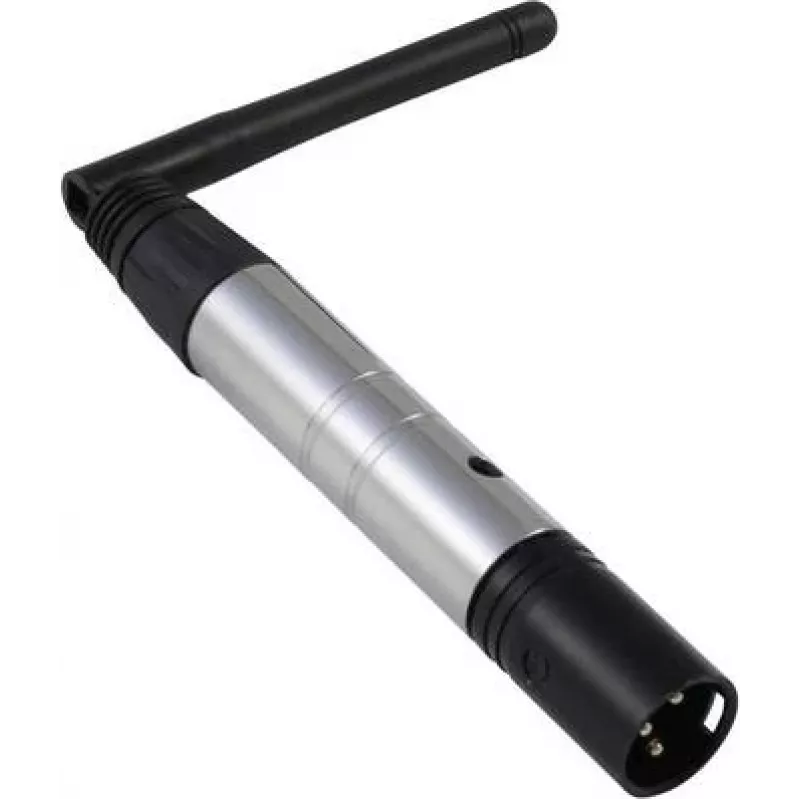
Trasmettitore DMX wireless EUROLITE QuickDMX 70064700 per il controllo remoto di DMX512

Trasmettitore DMX wireless EUROLITE QuickDMX 70064700 per il controllo remoto di DMX512
105,62 €
The EUROLITE QuickDMX 70064700 is a wireless DMX transmitter designed to send DMX512 control signals to compatible lighting fixtures and receivers. This device creates a cable-free connection for remote control of stage, event, and architectural lighting, simplifying setup and reducing cable runs. T... Leggi di più
Stock 50 Codice 2245487 Marca EUROLITE Modello 70064700 Garanzia 2 anni

Spedizioni e resi

Consegna stimata Martedì, Ottobre 27
Ti terremo aggiornato tramite il nostro sistema di tracciamento dettagliato
Opzioni di pagamento
Carta di credito/debitoVisaMastercardPayPalApple PayGoogle PayBonifico bancario

The EUROLITE QuickDMX 70064700 is a wireless DMX transmitter designed to send DMX512 control signals to compatible lighting fixtures and receivers. This device creates a cable-free connection for remote control of stage, event, and architectural lighting, simplifying setup and reducing cable runs. The transmitter pairs with compatible QuickDMX receivers to extend DMX control into areas where cabling is impractical or unsafe, maintaining the DMX512 protocol for reliable lighting control.

Advantages

The QuickDMX transmitter eliminates the need for long DMX cable runs, reducing installation time and tripping hazards. It supports standard DMX512 signal transmission with stable wireless performance and straightforward pairing to compatible receivers. Compact and lightweight, the unit integrates easily into existing lighting setups and can be mounted or positioned to optimize line-of-sight communication. Powering and LED indicators enable quick status checks during setup and operation.

Suitable for

Key specifications

How to use

Connect the EUROLITE QuickDMX transmitter to a DMX output on a console or interface using a standard DMX cable. Power the transmitter according to the manufacturer's instructions and ensure the unit's indicators show it is operational. Pair the transmitter with a compatible QuickDMX receiver by following the pairing procedure provided with the receiver: typically this involves setting both units into pairing mode and confirming the link via LED feedback. Once paired, address and control fixtures as usual from the console; the transmitter forwards DMX512 data wirelessly to the linked receiver(s).

Recommendations

For reliable operation, install the transmitter with a clear line of sight to the receiver where possible, avoid placing the unit near large metal obstructions or strong RF sources, and verify firmware and receiver compatibility before deployment. Use quality DMX cables for the console connection and verify channel addressing on fixtures after establishing the wireless link.

Punti salienti
  • Live event and concert lighting control
  • Theatrical and stage installations where cables are restricted
  • Temporary event rigs and touring setups
  • Architectural and exhibition lighting where concealed cabling is preferred
  • Outdoor or hard-to-reach fixtures when paired with compatible receivers
  • Wireless transmission of DMX512 control signals
  • Compatibility with QuickDMX receiver units for link pairing
  • Compact, lightweight enclosure suitable for mounting or placement
  • LED status indicators for power and signal/connection state
  • Low-latency operation designed for live-control environments
Specifiche
Peso
0.24 kg
Storico prezzi degli ultimi 6 mesi
Trasmettitore DMX wireless EUROLITE QuickDMX 70064700 per il controllo remoto di DMX512
Attuale
105,62 €
Minimo
104,70 €
Massimo
106,15 €
Variazione 24 h
+0,36 €   +0%
Settimana
-0,54 €   -1%
Mese
-0,00 €   0%

Prodotti più popolari in questa categoria

Ciao, sono l'assistente AI di DistriNode. Posso aiutarti a trovare prodotti, confrontare le opzioni, creare preventivi in PDF o aprire richieste di assistenza.