
Account Contatti
Il tuo carrello
Spedizione DPD & FedEx
Serve aiuto? Chiedi all'AI

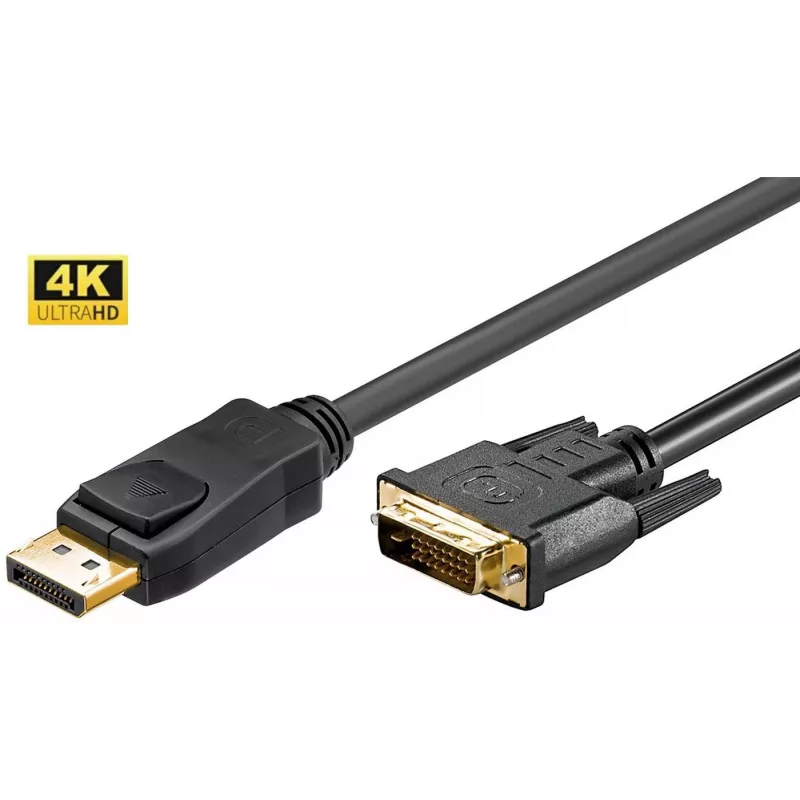
Microconnect DP-DVI-MM-300 Adattatore cavo video 3 m DisplayPort nero

Microconnect DP-DVI-MM-300 Adattatore cavo video 3 m DisplayPort nero
15,07 €
The Microconnect DP-DVI-MM-300 is a 3 m DisplayPort to DVI-D digital video cable adapter designed to transmit high-definition video from a DisplayPort-equipped source to a DVI monitor. It features a DisplayPort connector with gold-plated contacts, a slim 6 mm diameter cable and a lightweight constru... Leggi di più
Stock 383 Codice 1179198 Marca MICROCONNECT Modello DP-DVI-MM-300 Garanzia 2 anni

Spedizioni e resi

Consegna stimata Martedì, Ottobre 20
Ti terremo aggiornato tramite il nostro sistema di tracciamento dettagliato
Opzioni di pagamento
Carta di credito/debitoVisaMastercardPayPalApple PayGoogle PayBonifico bancario

The Microconnect DP-DVI-MM-300 is a 3 m DisplayPort to DVI-D digital video cable adapter designed to transmit high-definition video from a DisplayPort-equipped source to a DVI monitor. It features a DisplayPort connector with gold-plated contacts, a slim 6 mm diameter cable and a lightweight construction (66 g), making it suitable for desktop connections and portable setups.

Advantages

This cable adapter converts DisplayPort signals to DVI-D, allowing you to connect computers or laptops with DisplayPort outputs to DVI displays. Gold-plated contacts improve corrosion resistance and connectivity reliability. The 3 m length provides flexibility in desktop layouts while the compact 6 mm diameter keeps the cable manageable and easy to route.

Suitable for

  • Connecting a PC or laptop DisplayPort output to a DVI monitor
  • Extending video connection distance within a workstation
  • Use in home offices, classrooms, or meeting rooms where DVI displays are present

Key specifications

  • Cable length: 3 m
  • Connector 1: DisplayPort
  • Product colour: Black
  • Weight: 0.066 kg
  • Diameter: 6 mm
  • Standards: RoHS compliant
  • Brand: MicroConnect
  • Model: DP-DVI-MM-300
  • EAN: 5704327577249

How to use

Connect the DisplayPort end to the source device (computer or laptop) and the DVI-D end to the monitor. Ensure both devices are powered on and set the monitor to the correct input. If the display does not show an image, check that the source’s video output is enabled and that the cable is securely connected at both ends.

Recommendations

For best performance, avoid tight bends and sharp kinks in the 6 mm cable and keep the cable away from strong electromagnetic sources. Use the 3 m length to position devices comfortably but avoid excess coiling to reduce signal interference.
Punti salienti
  • Connecting a PC or laptop DisplayPort output to a DVI monitor
  • Extending video connection distance within a workstation
  • Use in home offices, classrooms, or meeting rooms where DVI displays are present
  • Cable length: 3 m
  • Connector 1: DisplayPort
  • Product colour: Black
  • Weight: 0.066 kg
  • Diameter: 6 mm
  • Standards: RoHS compliant
  • Brand: MicroConnect
  • Model: DP-DVI-MM-300
  • EAN: 5704327577249
Specifiche
3D
Yes
Altezza confezione
43 mm
Certificati di conformità
RoHS
Colore del prodotto
Black
Connettore 1
DisplayPort
Connettore maschio/femmina
Male/Male
Diametro del cavo
6 mm
DVI Dual Link
Yes
HDCP
Yes
Larghezza confezione
228 mm
Lunghezza del cavo
3 m
Materiale del cavo
Copper
Materiale della guaina
Polyvinyl chloride (PVC)
Peso
66 g
Peso confezione
166 g
Placcatura dei contatti del connettore
Gold
Profondità confezione
163 mm
Sezione del conduttore (AWG)
30
Versione DisplayPort
1.2
Versione HDCP
1.3

Brochure

Apri documento
Storico prezzi degli ultimi 6 mesi
Microconnect DP-DVI-MM-300 Adattatore cavo video 3 m DisplayPort nero
Attuale
15,07 €
Minimo
14,06 €
Massimo
18,57 €
Variazione 24 h
+0,92 €   +7%
Settimana
+0,95 €   +7%
Mese
+0,97 €   +7%

Prodotti più popolari in questa categoria

Ciao, sono l'assistente AI di DistriNode. Posso aiutarti a trovare prodotti, confrontare le opzioni, creare preventivi in PDF o aprire richieste di assistenza.