Account Contatti
Il tuo carrello
Spedizione DPD & FedEx
Serve aiuto? Chiedi all'AI

Splitter DisplayPort MicroConnect MC-DP-2XDP — duplicatore di segnale DisplayPort su 2x DisplayPort

Splitter DisplayPort MicroConnect MC-DP-2XDP — duplicatore di segnale DisplayPort su 2x DisplayPort
33,40 €
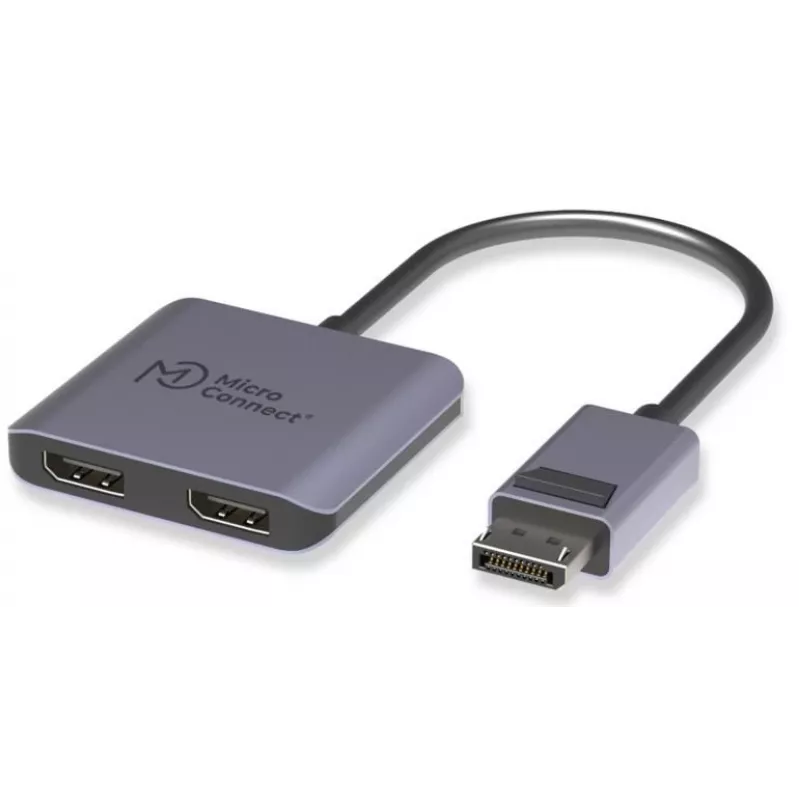
MicroConnect MC-DP-2XDP is a compact 2-in-1 DisplayPort MST hub that splits a single DisplayPort output into two independent DisplayPort connections. It supports up to 4K at 60Hz on a single display or dual 4K@60Hz operation (when the host and operating mode allow), making it suitable for high-resol... Leggi di più
Stock 138 Codice 1271701 Marca MICROCONNECT Modello MC-DP-2XDP Garanzia 2 anni

Spedizioni e resi

Consegna stimata Giovedì, Ottobre 22
Ti terremo aggiornato tramite il nostro sistema di tracciamento dettagliato
Opzioni di pagamento
Carta di credito/debitoVisaMastercardPayPalApple PayGoogle PayBonifico bancario

MicroConnect MC-DP-2XDP is a compact 2-in-1 DisplayPort MST hub that splits a single DisplayPort output into two independent DisplayPort connections. It supports up to 4K at 60Hz on a single display or dual 4K@60Hz operation (when the host and operating mode allow), making it suitable for high-resolution multitasking and expanded desktop setups. The hub features an aluminum housing, a short flexible 10 cm PVC cable and uses the LT8712EXI chipset for stable video transmission. It is compatible with Windows MST and with macOS in SST mode, and supports DSC, HDR and HDCP for accurate color and protected content playback.

Advantages

The adapter provides dual-display capability from one DisplayPort without requiring additional power, offering a compact and durable solution for users who need two monitors from a single port. The aluminum shell improves heat dissipation and durability, while the LT8712EXI chipset ensures stable image output. Short flexible cable design improves portability and reduces desk clutter. Support for DSC, HDR and HDCP expands compatibility with high-quality video and protected media.

Key specifications

  • Single display: 3840 × 2160 @ 60Hz
  • Dual display: MST/SST up to 3840 × 2160 @ 60Hz (depending on host support)
  • Cable length: 10 cm, flexible PVC
  • Housing: aluminum, grey colour
  • Chipset: LT8712EXI
  • OS compatibility: supports Windows with DP/MST; supports macOS in SST mode (A+B+B), does not support MST mode A+B+C on macOS
  • Video features: supports DSC, HDR and HDCP
  • Cable/spec construction: (7/0.08T*1P+AL+MY)*5C+7/0.08Tx4C+F+ADB16/6/0.12AL OD:4.80mm

How to use

Connect the MicroConnect MC-DP-2XDP to the host computer's DisplayPort output and attach one or two DisplayPort monitors to the hub's outputs. On Windows systems that support MST, configure multiple displays in the operating system display settings. On macOS, use SST mode and arrange displays in System Settings; note that macOS does not support MST mode A+B+C for this adapter. Ensure monitors and host support the desired resolution and refresh rate (4K@60Hz) and enable HDR or DSC in display settings if required.

Punti salienti
  • Single Display 3840*2160@60Hz;
  • Dual Display MST/SST 3840*2160@60
  • 10 cm cable
  • Aluminum housing, grey color
  • Chipset: LT8712EXI
  • Supports Windows system ports with DP protocol;
  • Supports macOS system ports in SST mode A+B+B, but does not support
  • MST mode A+B+C;
  • Supports DSC/HDR/HDCP.
  • Specs: (7/0.08T*1P+AL+MY)*5C+7/0.08Tx4C+F+ADB16/6/0.12AL OD:4.80mm

Brochure

Apri documento
Storico prezzi degli ultimi 6 mesi
Splitter DisplayPort MicroConnect MC-DP-2XDP — duplicatore di segnale DisplayPort su 2x DisplayPort
Attuale
33,40 €
Minimo
32,69 €
Massimo
34,45 €
Variazione 24 h
+0,50 €   +2%
Settimana
+0,43 €   +1%
Mese
+0,57 €   +2%

Prodotti più popolari in questa categoria

Marca: MICROCONNECT Stock: 56
24,81 €
IVA esclusa:20,34 €
Compra
Ciao, sono l'assistente AI di DistriNode. Posso aiutarti a trovare prodotti, confrontare le opzioni, creare preventivi in PDF o aprire richieste di assistenza.