
Account Contatti
Il tuo carrello
Spedizione DPD & FedEx
Serve aiuto? Chiedi all'AI

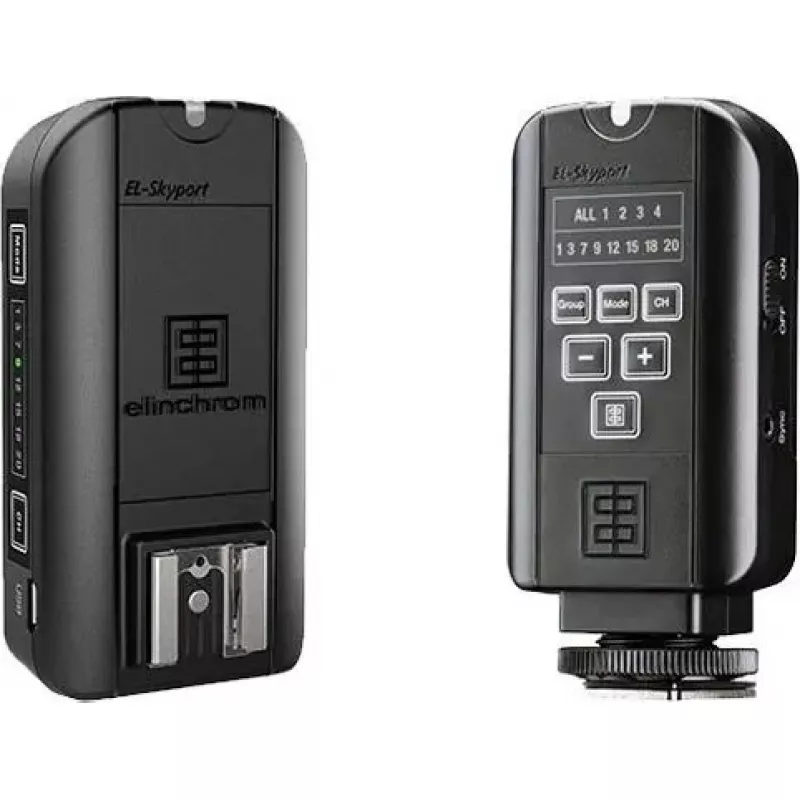
Trigger flash wireless Elinchrom EL‑Skyport Universal Plus E19370 per flash da studio

Trigger flash wireless Elinchrom EL‑Skyport Universal Plus E19370 per flash da studio
135,82 €
Elinchrom EL‑Skyport Universal Plus E19370 is a wireless flash trigger engineered to remotely trigger studio lights with universal compatibility. It connects camera and strobe to provide reliable off‑camera flash firing and synchronization, supporting common studio workflows such as portrait, produc... Leggi di più
Stock 1 Codice 2576363 Marca ELINCHROM Modello 19370 Garanzia 2 anni

Spedizioni e resi

Consegna stimata Venerdì, Ottobre 16
Ti terremo aggiornato tramite il nostro sistema di tracciamento dettagliato
Opzioni di pagamento
Carta di credito/debitoVisaMastercardPayPalApple PayGoogle PayBonifico bancario

Elinchrom EL‑Skyport Universal Plus E19370 is a wireless flash trigger engineered to remotely trigger studio lights with universal compatibility. It connects camera and strobe to provide reliable off‑camera flash firing and synchronization, supporting common studio workflows such as portrait, product and commercial photography. The unit is intended to simplify lighting setups and improve consistency when controlling compatible studio flash units from a distance.

Advantages

The Elinchrom EL‑Skyport Universal Plus offers a compact interface for camera‑to‑strobe communication without the need for cables. Its universal triggering functionality enables use with a wide range of studio lights that accept standard trigger pulses. The design emphasizes straightforward operation, stable triggering performance and reduced setup time, making it suitable for repetitive or multi‑light arrangements where reliable synchronization is required.

Suitable for

  • Studio portrait sessions with off‑camera lighting
  • Product and e‑commerce photography requiring consistent flash timing
  • Commercial shoots with multiple strobes and synchronized firing
  • Location work where cableless flash triggering is preferred

Key specifications

  • Wireless radio trigger for remote flash firing
  • Universal compatibility with studio strobes that accept trigger pulses
  • Compact form factor for mounting on camera hot shoe
  • Designed for reliable synchronization between camera and flash

How to use

Attach the EL‑Skyport Universal Plus to the camera hot shoe or place it on a stable mount and pair it with the receiver or the compatible studio light. Set the camera and flash to compatible sync settings, then trigger the unit from the camera to fire the connected strobes. Follow the studio light manufacturer’s instructions for any required receiver connection or flash mode settings to ensure proper firing and synchronization.

Recommendations

For consistent results, verify sync mode and channel settings on both camera and flash before shooting; test a few frames at working distances to confirm reliable triggering. Use secure mounting and maintain clear line‑of‑sight or recommended radio range for optimal performance.

Punti salienti
  • Studio portrait sessions with off‑camera lighting
  • Product and e‑commerce photography requiring consistent flash timing
  • Commercial shoots with multiple strobes and synchronized firing
  • Location work where cableless flash triggering is preferred
  • Wireless radio trigger for remote flash firing
  • Universal compatibility with studio strobes that accept trigger pulses
  • Compact form factor for mounting on camera hot shoe
  • Designed for reliable synchronization between camera and flash
Storico prezzi degli ultimi 6 mesi
Trigger flash wireless Elinchrom EL‑Skyport Universal Plus E19370 per flash da studio
Attuale
135,82 €
Minimo
133,28 €
Massimo
143,08 €
Variazione 24 h
+0,92 €   +1%
Settimana
+2,38 €   +2%
Mese
+2,54 €   +2%

Prodotti più popolari in questa categoria

Ciao, sono l'assistente AI di DistriNode. Posso aiutarti a trovare prodotti, confrontare le opzioni, creare preventivi in PDF o aprire richieste di assistenza.