
Account Contatti
Il tuo carrello
Spedizione DPD & FedEx
Serve aiuto? Chiedi all'AI

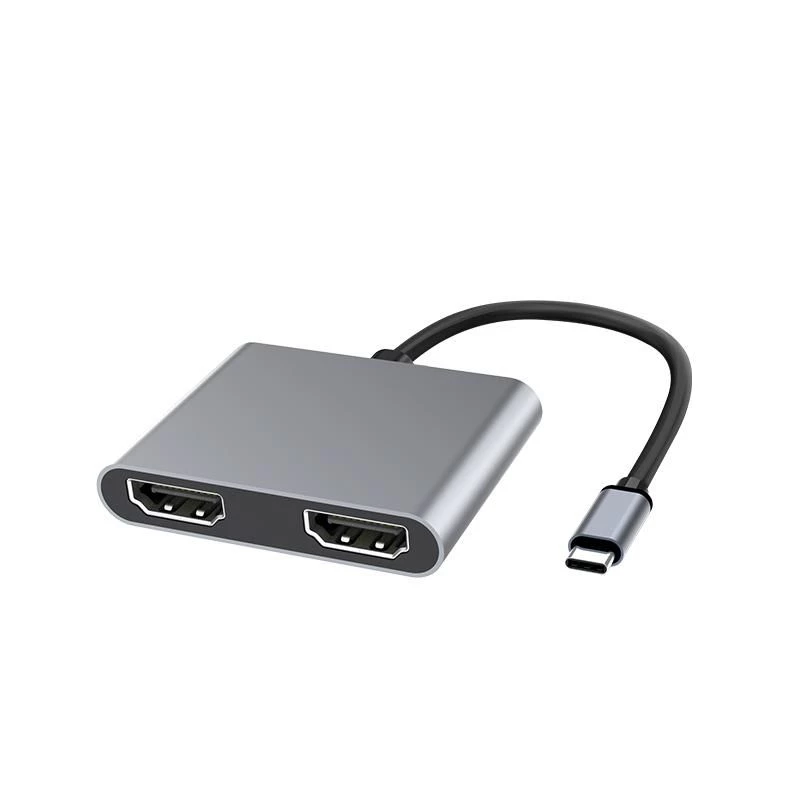
Microconnect USB3.1CHDMIX2 Adattatore grafico USB nero

Microconnect USB3.1CHDMIX2 Adattatore grafico USB nero
35,90 €
The MicroConnect USB3.1CHDMIX2 is a Type-C to dual HDMI adapter that lets you connect a USB-C source to two high-definition HDMI displays such as TVs or projectors. The compact black adapter supports both SST (Single-Stream Transport) and MST (Multi-Stream Transport) modes, enabling either mirrored ... Leggi di più
Stock 190 Codice 1188737 Marca MICROCONNECT Modello USB3.1CHDMIX2 Garanzia 2 anni

Spedizioni e resi

Consegna stimata Lunedì, Ottobre 19
Ti terremo aggiornato tramite il nostro sistema di tracciamento dettagliato
Opzioni di pagamento
Carta di credito/debitoVisaMastercardPayPalApple PayGoogle PayBonifico bancario

The MicroConnect USB3.1CHDMIX2 is a Type-C to dual HDMI adapter that lets you connect a USB-C source to two high-definition HDMI displays such as TVs or projectors. The compact black adapter supports both SST (Single-Stream Transport) and MST (Multi-Stream Transport) modes, enabling either mirrored output on two monitors or independent images on each screen. It is compatible with devices that support USB-C video output, including MacBook and Chrome OS devices like the Chromebook Pixel.

Advantages

The adapter provides straightforward expansion of display capability from a single USB-C port to two HDMI displays without requiring a full docking station. Its support for SST and MST gives flexibility to use mirrored or extended desktops. The unit is compact and lightweight, making it easy to carry and integrate into mobile or desktop setups.

Suitable for

  • Extending a laptop display to two external monitors for multitasking
  • Mirroring video output to two HDMI TVs or projectors for presentations
  • Using with MacBook, Chromebook Pixel and other USB-C devices with DisplayPort Alt Mode

Key specifications

  • Model: MicroConnect USB3.1CHDMIX2
  • Interface: USB Type-C (input) to 2× HDMI (output)
  • Modes supported: SST and MST
  • Colour: Black
  • Dimensions: 54 mm (W) × 15.5 mm (D) × 66 mm (H)
  • Weight: 0.08 kg
  • Package: 1 unit

How to use

Connect the adapter's USB-C connector to a compatible device with USB-C video output (DisplayPort Alt Mode). Attach up to two HDMI cables from the adapter to the HDMI inputs of your displays. Configure display settings on your computer to choose mirrored (SST) or extended (MST) mode as required. Ensure both displays are powered on and set to the correct HDMI input.

Recommendations

For best results, use HDMI cables rated for the resolution you need and verify your device supports DisplayPort Alt Mode over USB-C. If the second display is not detected, check the host device's display output settings and try restarting the system after reconnecting the adapter.
Punti salienti
  • Extending a laptop display to two external monitors for multitasking
  • Mirroring video output to two HDMI TVs or projectors for presentations
  • Using with MacBook, Chromebook Pixel and other USB-C devices with DisplayPort Alt Mode
  • Model: MicroConnect USB3.1CHDMIX2
  • Interface: USB Type-C (input) to 2× HDMI (output)
  • Modes supported: SST and MST
  • Colour: Black
  • Dimensions: 54 mm (W) × 15.5 mm (D) × 66 mm (H)
  • Weight: 0.08 kg
  • Package: 1 unit
Specifiche
Altezza
66 mm
Altezza confezione
18 mm
Codice Sistema Armonizzato (HS)
84733020
Colore del prodotto
Black
Larghezza
54 mm
Larghezza confezione
278 mm
Peso
31 g
Peso confezione
82 g
Profondità
15.5 mm
Profondità confezione
161 mm
Quantità per confezione
1 pc(s)

Brochure

Apri documento
Storico prezzi degli ultimi 6 mesi
Microconnect USB3.1CHDMIX2 Adattatore grafico USB nero
Attuale
35,90 €
Minimo
34,95 €
Massimo
37,72 €
Variazione 24 h
+0,46 €   +1%
Settimana
+0,71 €   +2%
Mese
+0,88 €   +3%

Prodotti più popolari in questa categoria

Ciao, sono l'assistente AI di DistriNode. Posso aiutarti a trovare prodotti, confrontare le opzioni, creare preventivi in PDF o aprire richieste di assistenza.