
Account Contatti
Il tuo carrello
Spedizione DPD & FedEx
Serve aiuto? Chiedi all'AI

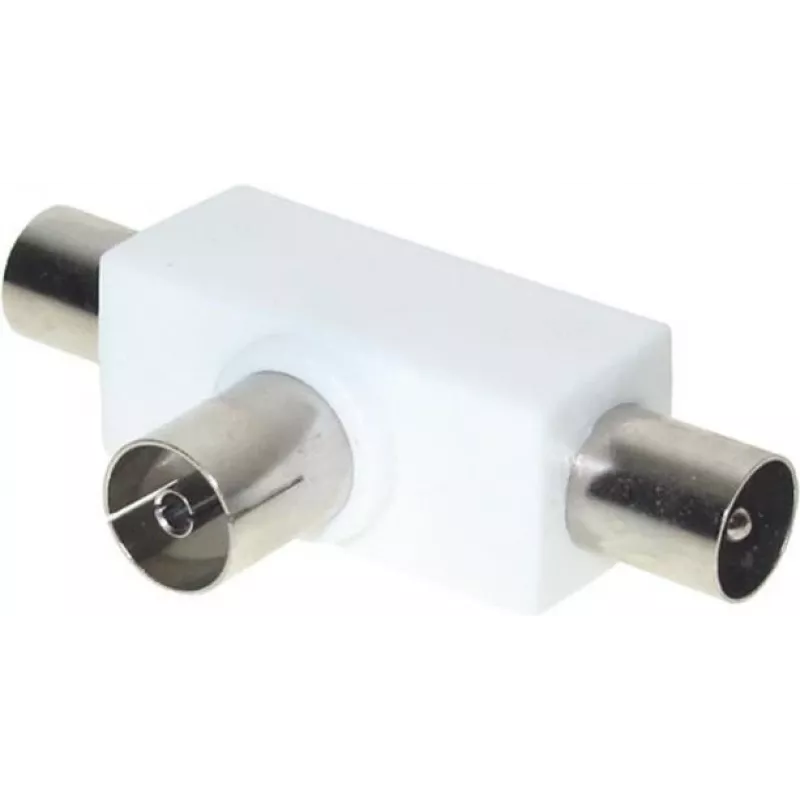
Splitter coassiale ShiverPeaks BS83100

Splitter coassiale ShiverPeaks BS83100
14,38 €
The ShiverPeaks BS83100 coaxial connector provides a compact solution for splitting a single IEC signal into two IEC outputs. Designed for audio and video connections, it features one IEC input and two IEC outputs in a small, durable housing. The connector is intended for reliable RF and coaxial sig... Leggi di più
Stock 2338 Codice 2251685 Marca SHIVERPEAKS Modello BS83100 Garanzia 2 anni

Spedizioni e resi

Consegna stimata Giovedì, Ottobre 22
Ti terremo aggiornato tramite il nostro sistema di tracciamento dettagliato
Opzioni di pagamento
Carta di credito/debitoVisaMastercardPayPalApple PayGoogle PayBonifico bancario

The ShiverPeaks BS83100 coaxial connector provides a compact solution for splitting a single IEC signal into two IEC outputs. Designed for audio and video connections, it features one IEC input and two IEC outputs in a small, durable housing. The connector is intended for reliable RF and coaxial signal transmission where a simple, passive split is required.

Advantages

This coaxial connector delivers a compact footprint and straightforward passive splitting without the need for additional power. Its IEC-type contacts ensure compatibility with common coaxial cables and devices used in home entertainment and basic AV installations. Constructed from quality materials, the connector offers mechanical durability for repeated connection and disconnection and stable signal continuity for routine use.

Suitable for

  • Splitting a single antenna or cable TV feed to two IEC-equipped devices
  • Connecting multiple set-top boxes, TVs, or radios to a single wall outlet
  • Temporary or permanent basic AV installations where passive splitting is acceptable

Key specifications

  • Connector type: IEC coaxial input with two IEC coaxial outputs
  • Function: Passive signal split (1-to-2)
  • Compatibility: Standard IEC coaxial cables and consumer RF equipment
  • Packaging: Single unit per pack
  • Dimensions: compact form factor suitable for in-line or near-wall use

How to use

To use the ShiverPeaks BS83100, connect the incoming coaxial cable to the IEC input and attach the two outgoing coaxial cables to the IEC outputs. Ensure connectors are seated firmly to maintain signal continuity. Use appropriate cable lengths and routing to avoid excessive bending or strain on connectors. No power or configuration is required; the device operates as a passive splitter.

Recommendations

For best results, use short, high-quality coaxial cables and avoid long parallel runs that can degrade signal strength. If signal loss or interference is observed, consider an active amplifier or a professionally installed distribution system rather than adding multiple passive splits.

Punti salienti
  • Splitting a single antenna or cable TV feed to two IEC-equipped devices
  • Connecting multiple set-top boxes, TVs, or radios to a single wall outlet
  • Temporary or permanent basic AV installations where passive splitting is acceptable
  • Connector type: IEC coaxial input with two IEC coaxial outputs
  • Function: Passive signal split (1-to-2)
  • Compatibility: Standard IEC coaxial cables and consumer RF equipment
  • Packaging: Single unit per pack
  • Dimensions: compact form factor suitable for in-line or near-wall use
Specifiche
Colore del prodotto
White
Connettore 1
IEC
Connettore 1 maschio/femmina
Female
Connettore 2
2 x IEC
Connettore 2 maschio/femmina
Male
Materiale della scocca
Iron
Placcatura dei contatti del connettore
Nickel
Quantità per confezione
1 pc(s)
Tipo di connettore
IEC
Storico prezzi degli ultimi 6 mesi
Splitter coassiale ShiverPeaks BS83100
Attuale
14,38 €
Minimo
13,79 €
Massimo
14,38 €
Variazione 24 h
+0,43 €   +3%
Settimana
+0,53 €   +4%
Mese
—   

Prodotti più popolari in questa categoria

Ciao, sono l'assistente AI di DistriNode. Posso aiutarti a trovare prodotti, confrontare le opzioni, creare preventivi in PDF o aprire richieste di assistenza.